01 - THE BUSINESS PROBLEM
A growth KPI, three stakeholders, and zero room for the wrong call.
“Before any design work began, I needed to understand what success actually meant for the business and who had conflicting ideas about how to get there.”
I worked as a Product Designer focusing on simplifying the early stage of course creation.
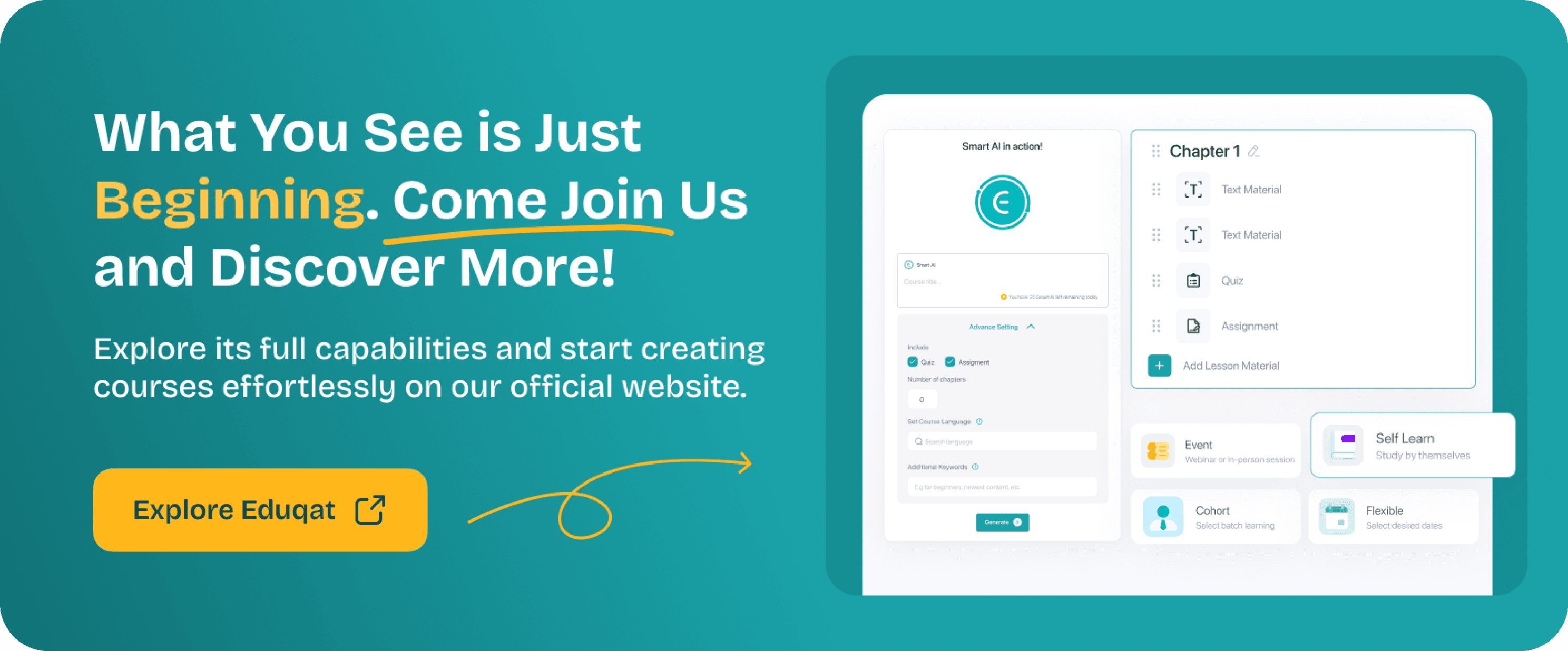
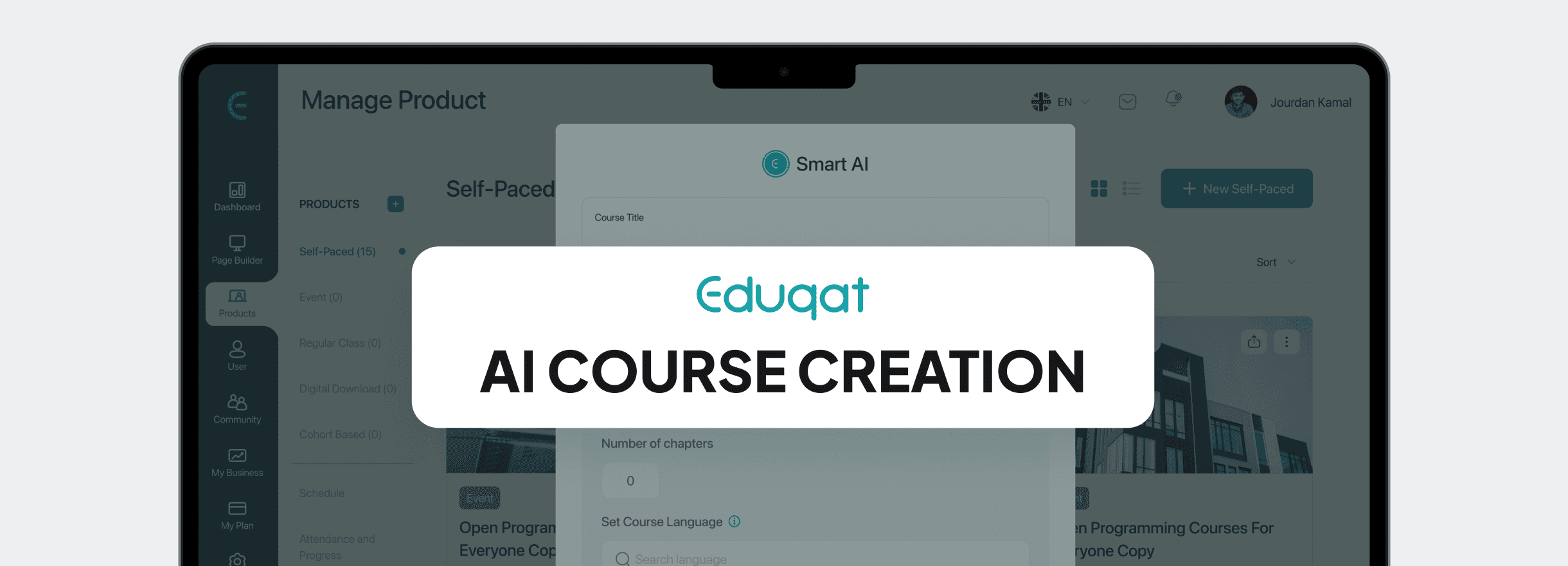
We redesigned how educators start building courses by shifting from manual structuring to an AI-assisted flow and reducing the effort required to go from idea to structured curriculum.
What I built?
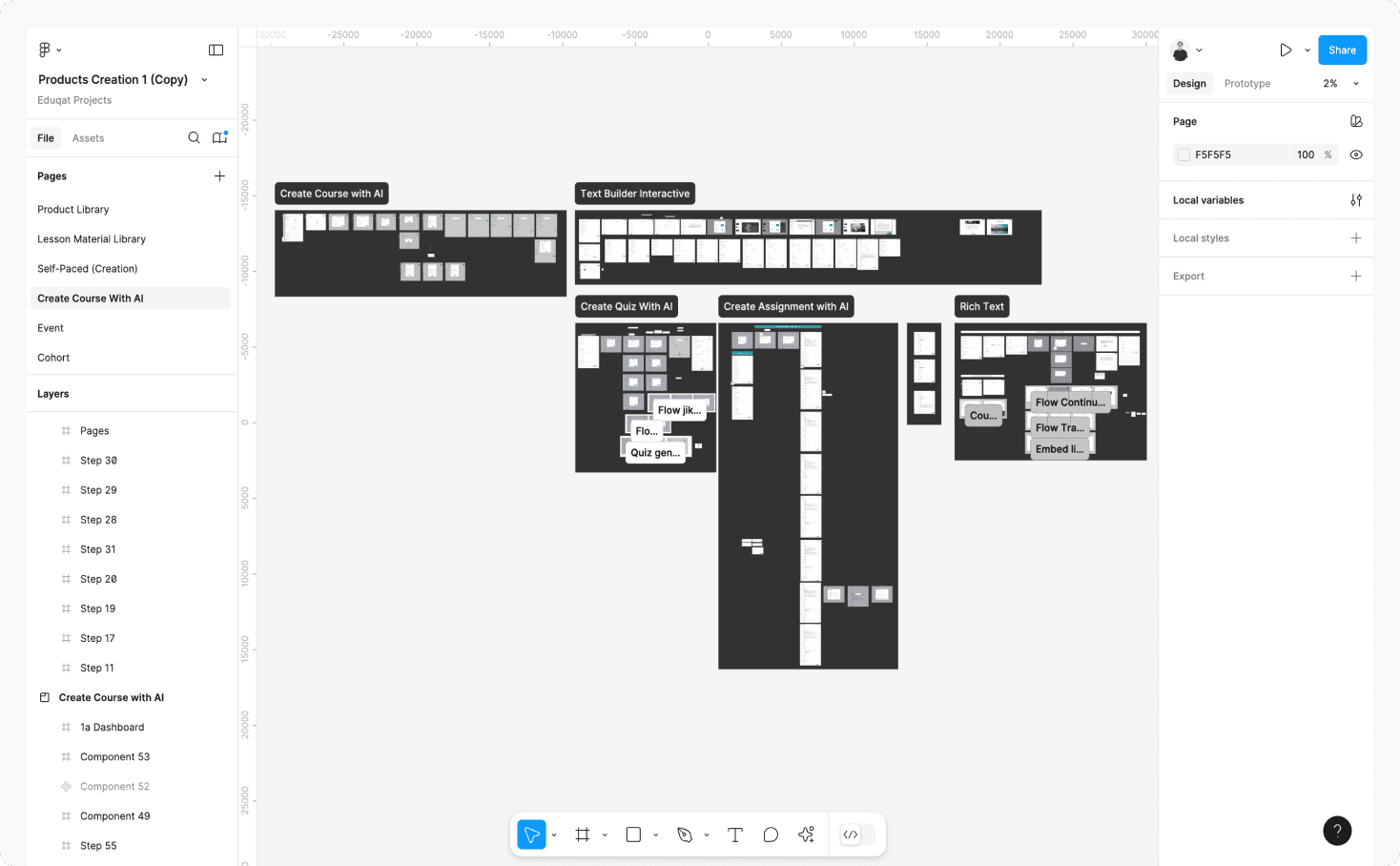
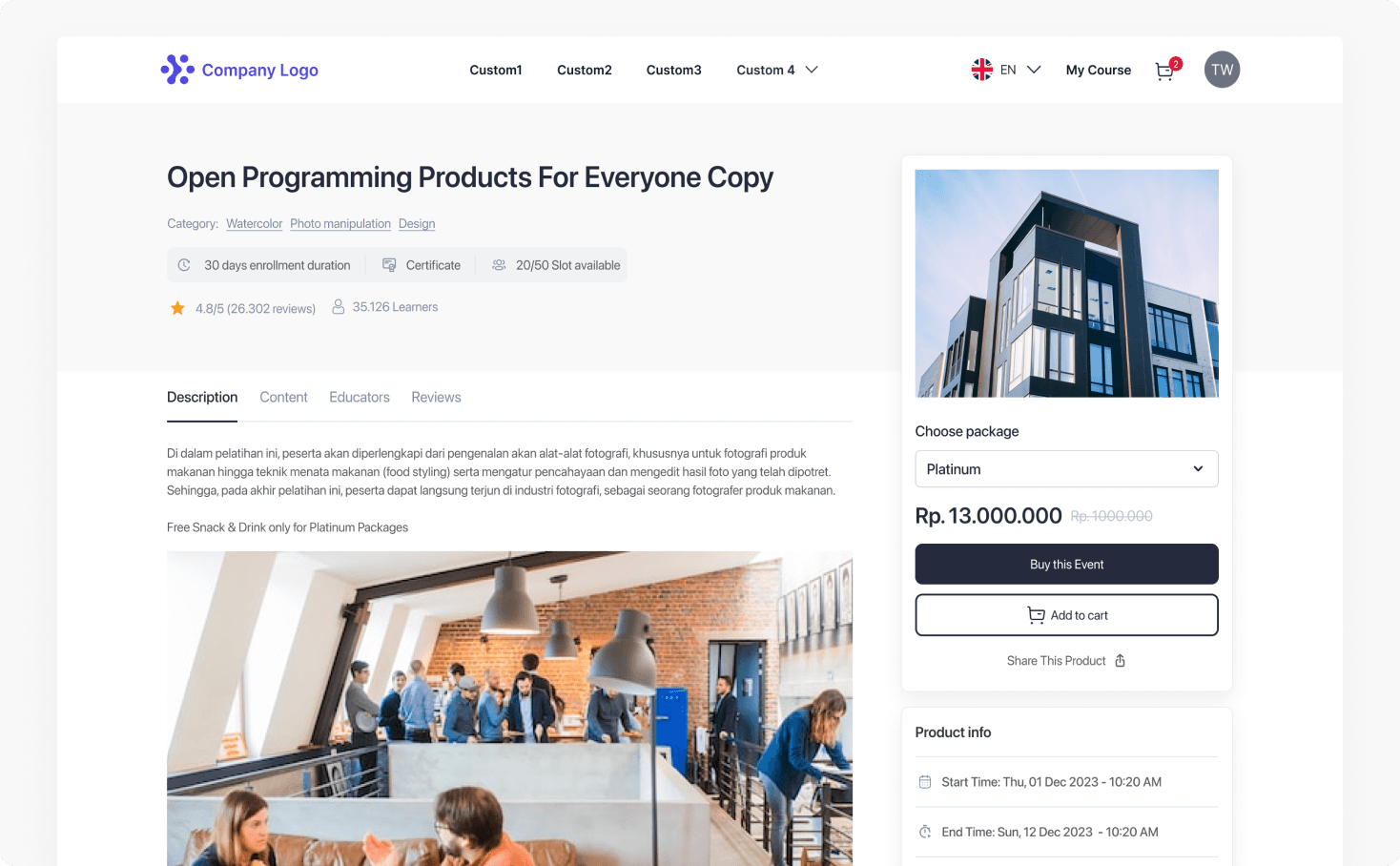
The company goal
Eduqat needed educators to create courses faster. Every course that didn't get published was a gap in the platform's content library, and fewer courses meant fewer learners, which directly affected revenue. The product team had a growth KPI tied specifically to course creation velocity, so this wasn't just a UX improvement project. It had real business stakes.
✓
Business context
"We need to increase how fast educators build courses so we can grow our content supply and improve activation on the platform. Every week a course doesn't get created is a week a learner can't find what they need."
The constraints I was working inside
This wasn't a blank canvas project. The AI capability in this version was limited to structured output and rich text only, which meant we couldn't promise features that the technology couldn't deliver yet. On top of that, we had a 3 to 4 months timeline, an existing design system we had to work within, and a developer handoff process that needed to be fast and clean through Jira.
Where the stakeholders disagreed
Three different groups had three different ideas about what we were building, and I was in the middle of all of them throughout the entire project.
Pulling toward full AI automation
✕
The business team wanted something impressive to show in demos or investor meeting
✕
C level pushed for full content generation
✕
There was pressure to match what competitors were announcing
Pulling toward user control
✓
Educators wanted ownership of their content
✓
Research kept showing that full automation damaged trust
✓
Engineering had concerns about the feasibility of full generation
The PM wanted more features. The customer success team was surfacing real user pain. Engineering was trying to protect the codebase from scope creep. My job was to hold all three of those realities at the same time and find a direction that made sense for everyone.
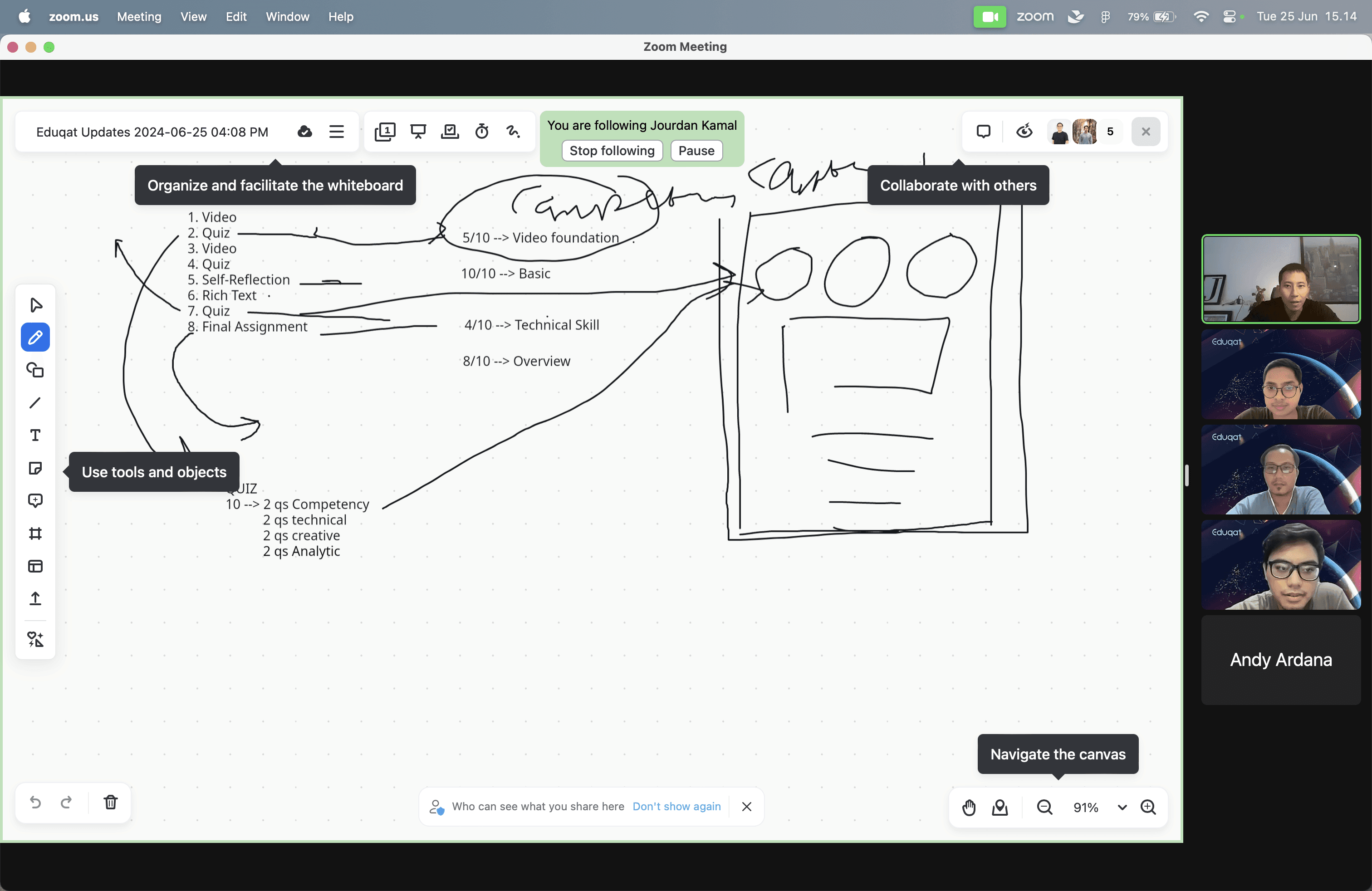
Stakeholder alignment across Zoom, Lark, and FigJam. Competing goals required constant re-anchoring to user evidence.
02 - BRIEF VS REALITY
The brief said speed. Research said that was the wrong problem entirely.
“If I had executed the original brief without questioning it, I would have built the wrong thing faster.”
What I was asked to build
The brief was straightforward on the surface. Build an AI course creation feature so educators can generate courses faster. Speed up the process, use AI, and ship it.
The original brief
"Build an AI course creation feature so educators can generate courses faster."
What I noticed when I started looking closer
During secondary research and stakeholder data synthesis, I kept finding the same pattern across multiple sources. Educators weren't abandoning course creation because writing was hard or because they were slow at it. They were abandoning it before they ever wrote a single word.
They were getting stuck at the very beginning, staring at an empty builder, not knowing how to start organizing what they wanted to teach. The original brief assumed the problem was in the creation process. But the actual dropout was happening before the creation process even began.
The brief was solving for the wrong bottleneck. Speed wasn't the issue. The blank page was. And that one distinction changed everything about what we actually needed to build.

The brief assumed the problem was speed. What I found: the real dropout happened before educators typed a single word.
03 - THE REAL PROBLEM
Educators weren’t slow. They were stuck before they typed a single word.
“Reframing a brief is the hardest and most valuable thing a designer can do. Here’s what the research actually revealed.”
What was really going on
After going through the research, the problem became clear. It wasn't that educators were generating content slowly. It was that they didn't know how to structure their ideas before they could write anything at all. Structuring a course from scratch is actually a learned skill, not something that comes naturally to most people. Subject matter experts know their content deeply, but that doesn't mean they know how to architect it into chapters and lessons.
The blank builder was forcing them into an architect role before they were ready to be in a creator role. That's a very different problem than what the brief described, and it required a very different solution.
✓
Reframed problem
Educators aren't slow because they can't write and they're stalled because they don't know where to begin. The blank state creates cognitive overhead that stops creation before it starts.
“If your brief never changed after research, that's a credibility problem”
The specific user we were designing for
Non-technical educators between 25 and 35 years old who stall for 2 to 5 minutes at the blank builder, not because they lack knowledge about their subject, but because structuring a curriculum is a skill they were never taught and the existing product gave them no help with it.
👩🏫
Educator, secondary school teacher
Observed during secondary research synthesis
"I know what I want to teach. I just don't know where to begin. If someone gave me a skeleton, I could fill it in immediately."
The business cost of this going unsolved
When educators stall at the starting point, fewer courses get published. Fewer courses means a weaker content library, which means fewer learners finding what they need, which means slower platform growth overall. Every educator who gave up before starting was a course that could have been monetized but wasn't.
04 - DISCOVERY & EVIDENCE
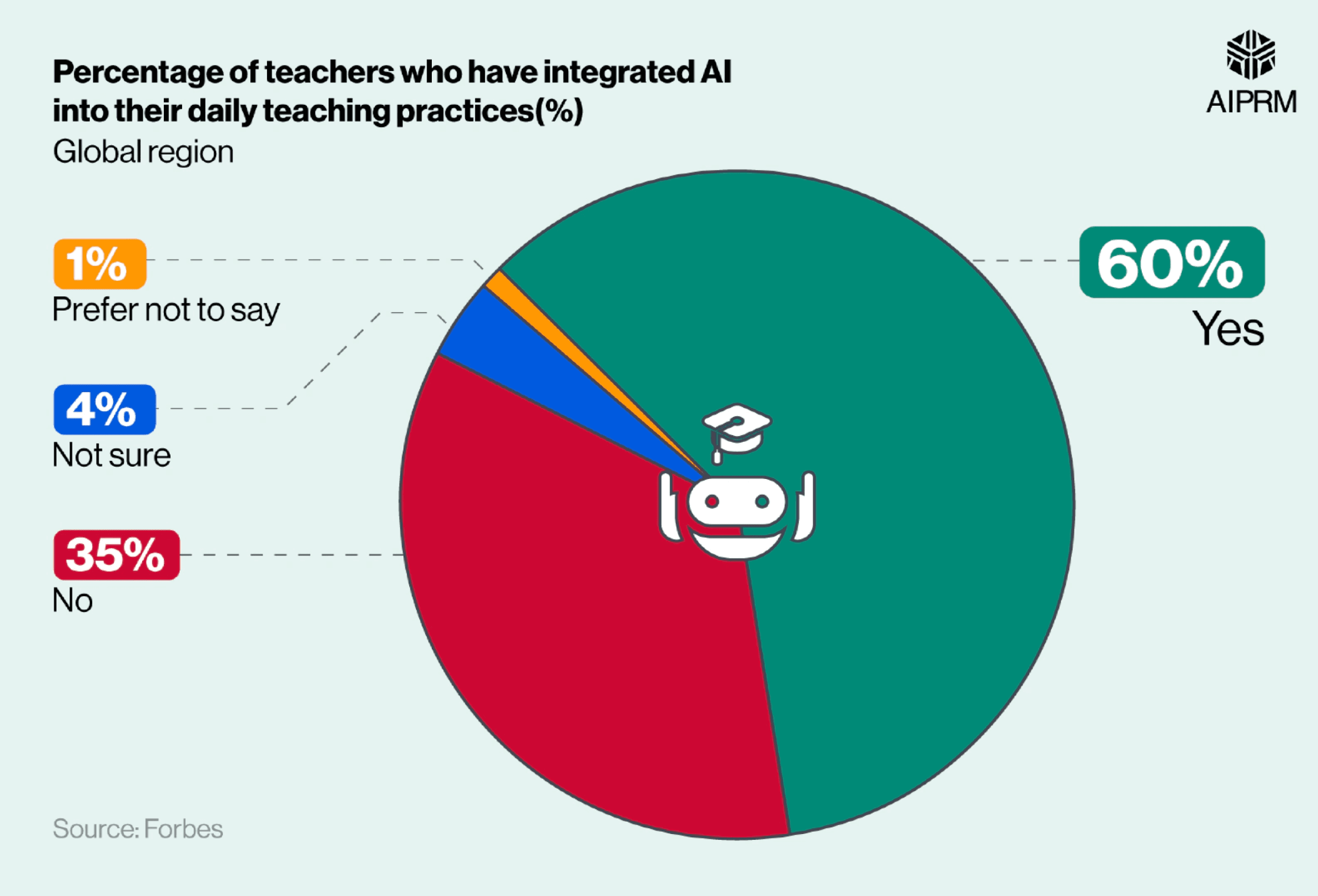
60% of teachers already use AI daily. The problem was never adoption, it was trust.
“I ran secondary research across more than ten sources before proposing any solution. Here is what the data said and the specific insight that changed our entire direction.”
What the industry data was telling us
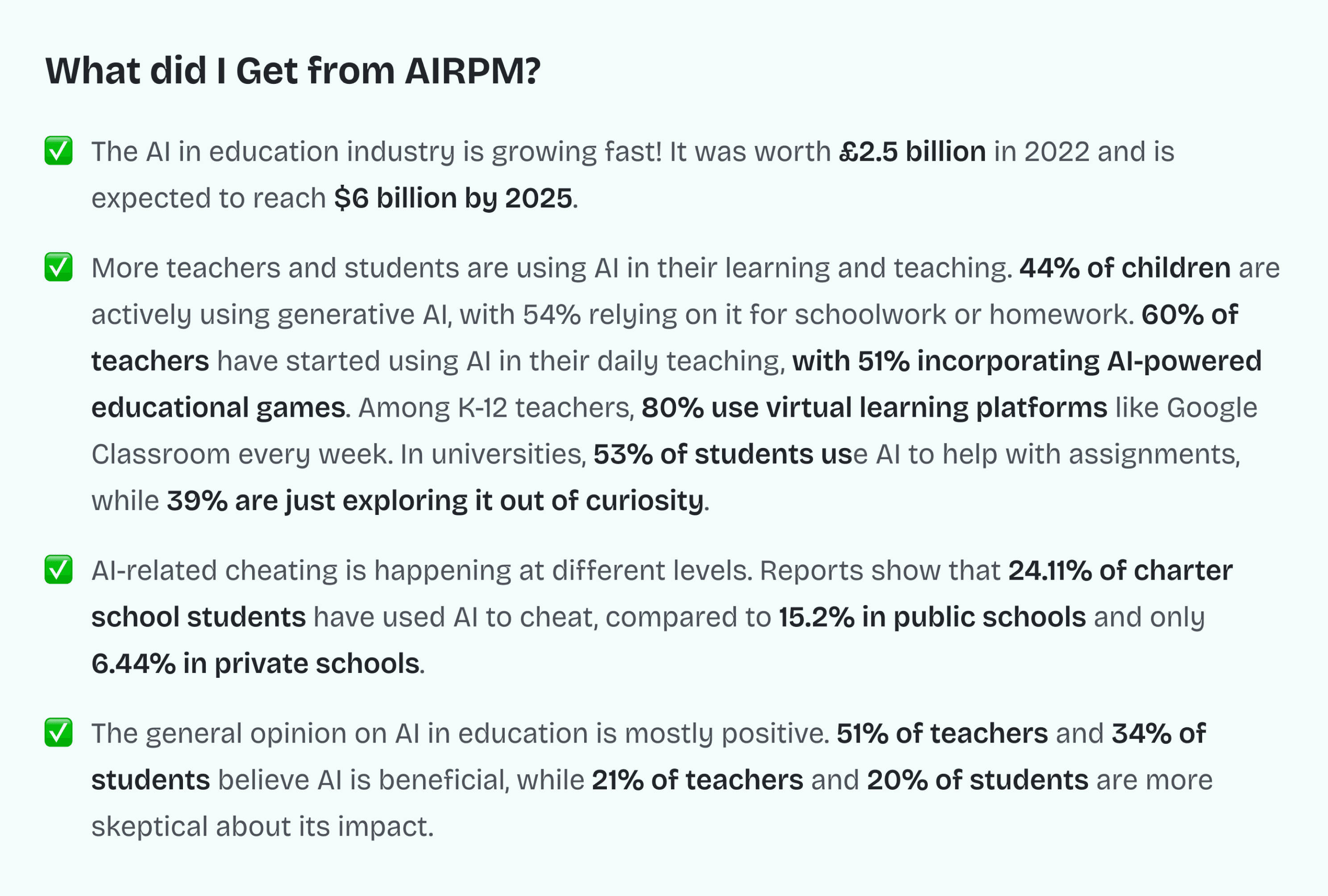
Before proposing any design direction, I spent time understanding the broader context of AI in education. What I found was surprising. The conversation in the industry was still treating AI adoption as a challenge to overcome, but the numbers told a completely different story.
of teachers have already incorporated AI into their daily teaching. Source: Forbes survey, 2024
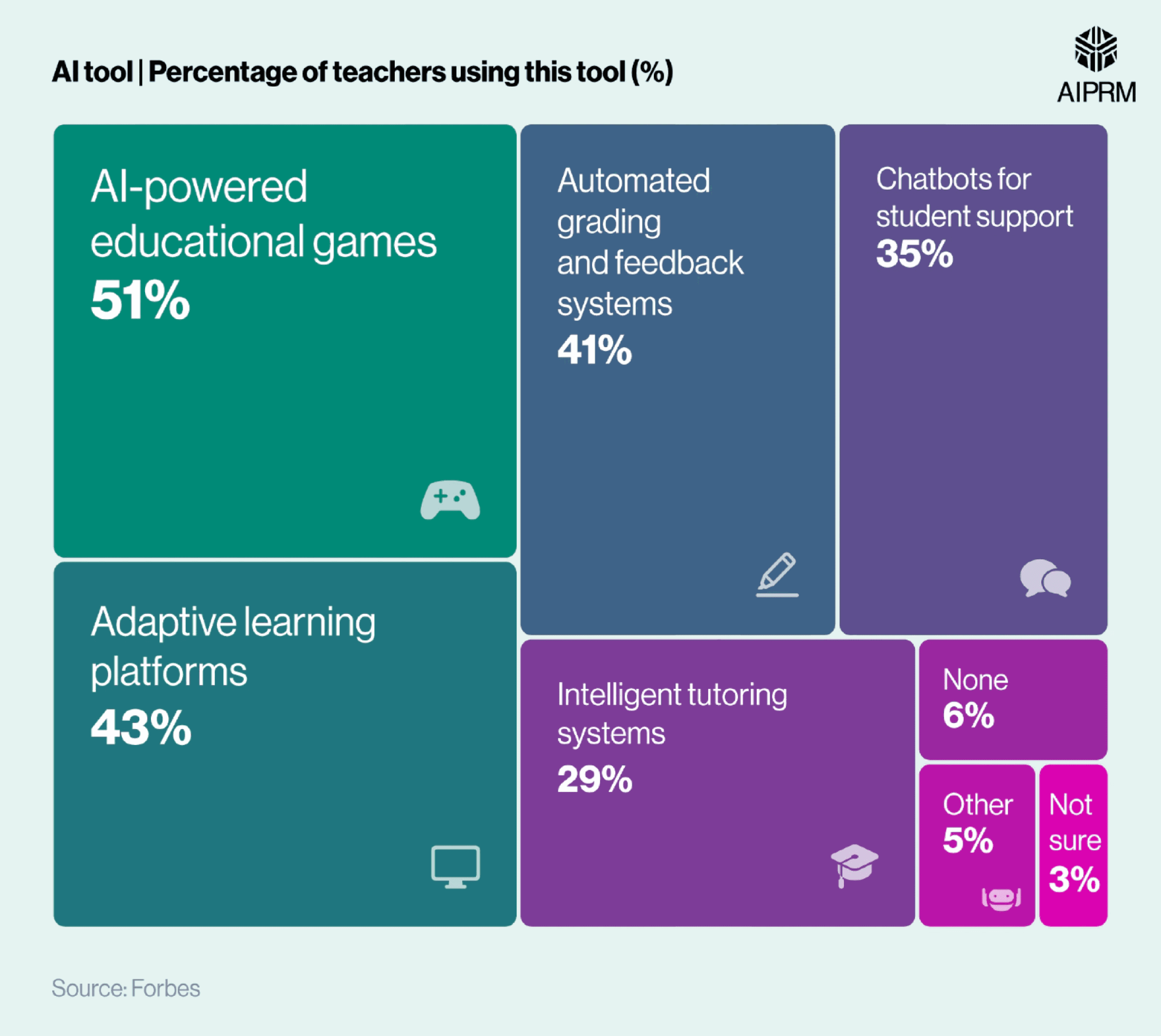
Use AI chatbots to support students. Source: AIPRM Education Statistics Report
This reframed our entire positioning argument internally. Educators were not resistant to AI. They were already using it in their daily work. The problem wasn't getting them to adopt AI at all. The problem was building something they would actually trust enough to keep using, because the tools they had been using elsewhere were not designed specifically for course creation.
“If 60% of teachers already use AI daily, the question isn't "will they use it", but it's "will they trust ours enough to keep using it."
Research conclusion I presented to the Head of Product and Sr. Product & Consultant
Three actionable directions from research
1
AI-Driven Curriculum Assistance. Building structure, not just content
AI suggests course structure and lesson sequences. Removes blank-state anxiety without writing content the educator didn't approve. This became our MVP focus.
2
Smart Content Generation to Rich text, scoped to MVP v1
AI assists in-line with rich text content, lesson summaries, and quiz generation. Scoped to rich text in MVP and full generation deferred post-launch.
3
AI Assessment & Feedback to Post-MVP roadmap
Automated quiz grading and feedback suggestions. Explicitly deferred to v2 that keeping MVP scope clean and buildable.
05 - COMPETITIVE LANDSCAPE
No competitor had the full AI creation lifecycle in one flow. That was the opening.
“I benchmarked five leading platforms across five dimensions to find where Eduqat could genuinely lead rather than just catch up.”
I looked at Thinkific, Kajabi, Teachable, Mini Course Generator, and Learnworlds and compared them across AI course creation, AI assessment, AI quiz generation, pricing, and active user base. The goal was to find gaps we could actually fill, not just features we could copy.
Platform
AI Assessment
AI Quiz
Pro Pricing
Active Users
Thinkific
Partial
No
Limited
~$99/mo
50k+
Kajabi
Partial
No
Limited
~$149/mo
60k+
Teachable
No
No
No
~$99/mo
100k+
Mini Course Gen
Yes
No
Partial
~$49/mo
10k+
Learnworlds
Yes
Partial
Yes
~$99/mo
5k+
Eduqat (Target)
Yes, full
On roadmap
Included
Competitive
Growing
Not a single competitor was offering structured AI course creation together with rich text assistance and quiz generation in one cohesive flow. That gap was exactly where Eduqat had room to build something genuinely differentiated.
“If your brief never changed after research, that's a credibility problem”
06 - THE DESIGN BET
We had three directions. Two were reasonable. Only one was backed by evidence.
“Before wireframing anything, the team needed to agree on a strategic direction. I advocated for the option that research supported, not the one that looked best in a stakeholder demo.”
The three directions we considered
✕
Direction A: Full AI generation (Rejected)
Generate everything. Fast, impressive in a demo. But early exploration showed educators felt ownership loss. Trust dropped. Adoption risk was high. Rejected by evidence, not opinion.
✕
Direction B: Manual flow (Rejected)
Keep it as is. No risk, but no improvement. Doesn't solve the stall problem. But this was also rejected and we'd have shipped nothing meaningful.
✓
Direction C: Hybrid AI-assisted
This was the direction that the research kept pointing toward. AI generates a course skeleton. The educator fills in everything that actually matters. The result is fast enough to remove the blank-page anxiety while preserving the sense of ownership that keeps educators engaged. This became our core product direction.
The insight that made this clear
At a certain point during the research synthesis, one pattern became impossible to ignore. Every time an educator saw fully AI-generated content, their reaction was some version of the same thing.
👨💼
Corporate trainer, experienced course creator
From secondary research synthesis
"If the AI writes everything, I lose my voice in it. But if it just gives me a structure to start from, that is actually useful. That is the kind of help I would pay for."
That quote reframed how we thought about the whole product. We weren't building an AI that creates. We were building an AI that removes the hardest starting point and then steps aside. The structure first approach wasn't a compromise we landed on reluctantly. It was the right call.
07 - HOW IT WORKS
From a blank screen to a structured course in five steps.
“Here is the end to end flow I designed. Understanding this journey is essential context for the trade-off decisions that came after.”
Three actionable directions from research
1
Login via SSO → Dashboard → Product menu
The first thing they see is a familiar view of everything they have already created. This is intentional. We wanted the new experience to begin from a place they already knew, not from a completely unfamiliar screen.
2
Create New Course → Choice modal
This is the moment that solves the blank-page problem. Instead of dropping into an empty builder, educators see two paths presented with equal visual weight.
3a
Path A: Start from Blank → Curriculum Builder
Experienced educators who already know how they want to structure their course can go directly to the manual builder. Nothing about their existing workflow changes. We added a new path without removing the old one.
3b
Path B: Generate with AI → Prompt → Skeleton
Educators who want help structuring enter two things: how many chapters they want and the complexity level they are aiming for. That is all we ask for. Within seconds, AI returns a complete course skeleton immediately.
5
Review & edit generated outline
Every chapter title is immediately renameable and reorderable. The visual design intentionally signals that this is a draft, not a finished product. We wanted educators to feel invited to change things, not pressured.
6
Add content via Rich Text with AI assist on-demand
Once the structure is in place, the writing experience becomes much lighter. Educators are now in iteration mode rather than creation mode. AI suggestions are available inline, so educators can choose when to use them.
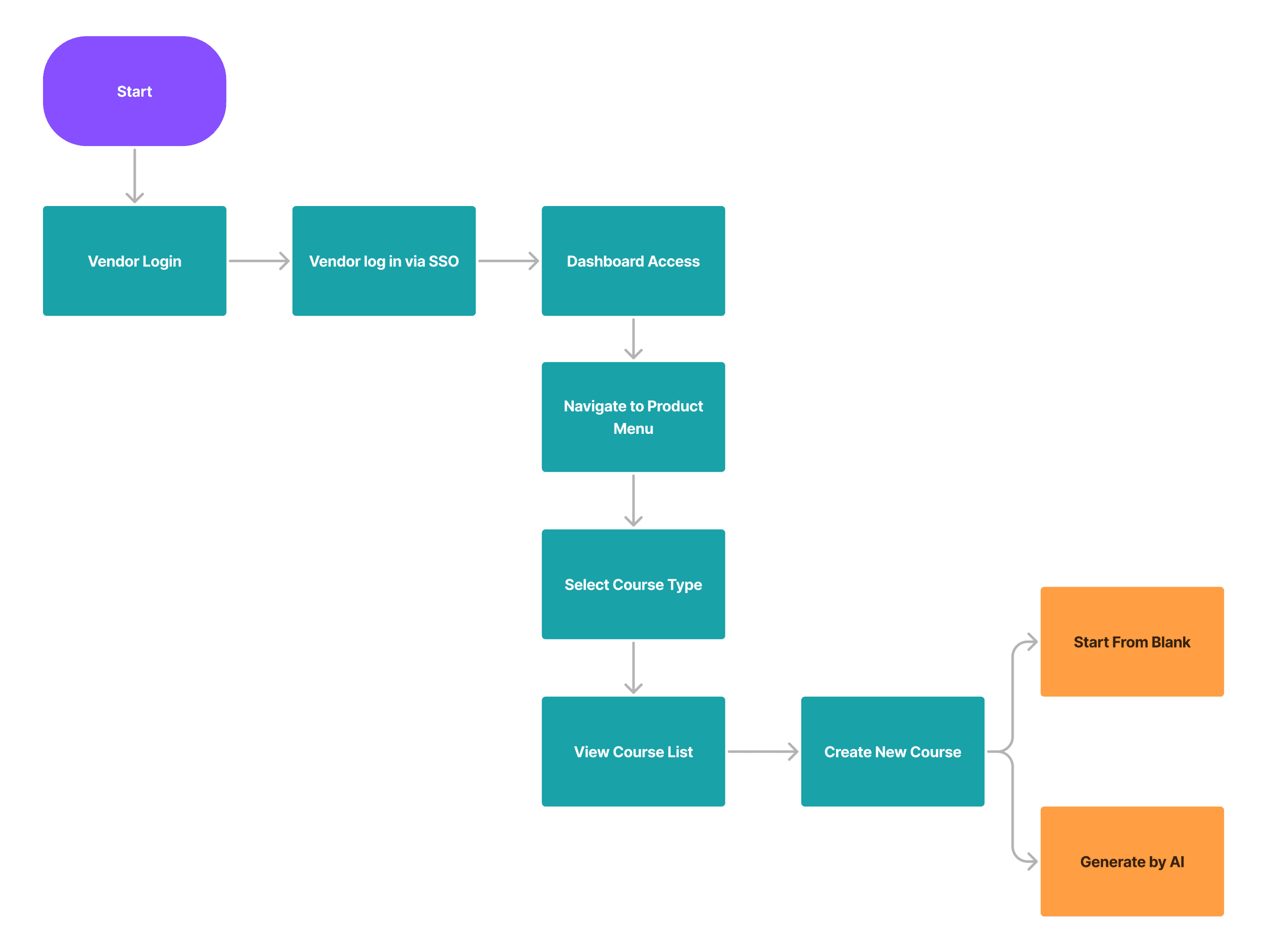
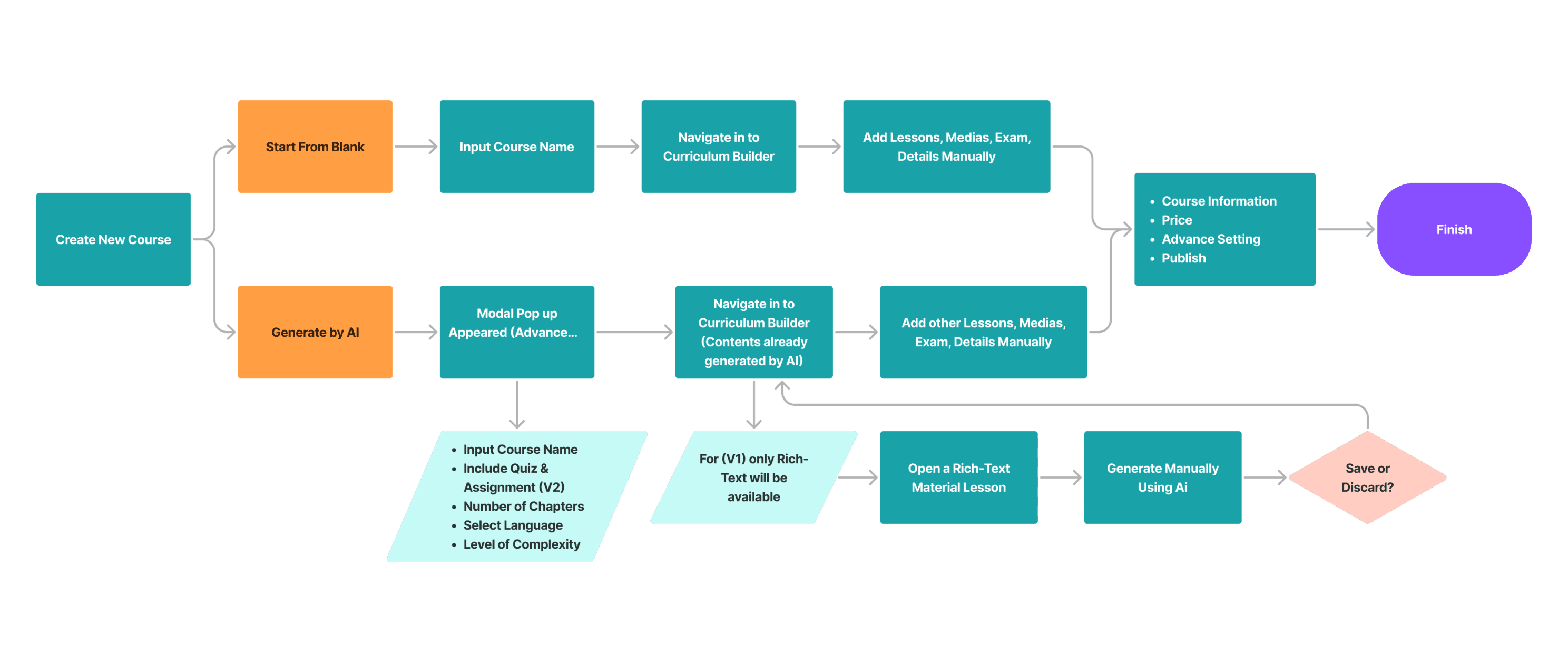
The user flow mapped collaboratively in FigJam. The dual path was the most important structural decision because it balanced speed with control without forcing either group to change how they worked.
08 - TRADE-OFFS MADE
Every real design decision has something you gave up. Here are the three that defined this product.
“These were not obvious choices. Each one involved competing stakeholder goals, real constraints, and a trade-off I had to be willing to defend with evidence rather than preference.”
⚡ Most Critical Decision
Decision 01 - The core product bet
AI should generate structure only, not full content
Situation
Stakeholders wanted full AI content generation. Research showed educators didn't trust content they didn't write. These two goals were in direct conflict.
options
Option A : Full generation = impressive demo, high adoption risk, low trust.
Option B : Structure-only = less impressive, higher usability, higher trust.
what we choose:
Option B : Structure-first AI. AI generates skeleton. Educators write the substance.
WHY
Ownership is a prerequisite for trust. If educators don't feel the course is theirs, they disengage which defeats the business goal entirely.
What I gave up :
A more impressive product demo. The PM was initially resistant. I had to present research directly to the Head of Product to get alignment. Less flashy and more adoptable.
Decision 02 - Entry point architecture
Dual entry flow, not forced AI adoption
Situation
We needed to introduce AI without alienating experienced educators who had existing workflows.
options
Option A : AI-only entry = Simpler flow, forces behavior change, higher abandonment risk.
Option B : Dual paths = more surface area, respects diverse confidence levels.
what we choose:
Option B : Two equal entry paths. No visual hierarchy bias toward either option.
Why
Voluntary AI adoption creates higher retention than mandated flows. When users choose AI themselves, they're already bought in.
What I gave up :
A cleaner, simpler entry point. Two paths means more states, more edge cases, more developer scope.
Decision 03 - AI prompt design
Constrained structured input, not open-ended prompt
Situation
How much freedom to give educators in the AI prompt?
options
Option A : Open text = maximum flexibility, variable output, hard to trust.
Option B : Structured fields (chapter count + complexity), constrained, predictable, and trustworthy.
what we choose:
Option B : Constrained structured form. Chapter count and complexity as the two core inputs.
Why
Unpredictable AI output erodes trust faster than limited capability. Reliability builds the long-term educator relationship with AI.
What I gave up :
Advanced users who wanted finer control. Deliberate MVP trade-off and more fields can come in v2 once baseline trust is established.
Push-back moment when I disagreed and acted
The PM, Head of Product, and Sr. Product & Consultant wanted AI notifications surfaced in the same sprint. I pushed back with evidence showing unsolicited AI suggestions disrupted writing flow and reduced task completion confidence.
The outcome
AI assist stayed completely on-demand throughout the rich text editor. Educators could call on it whenever they
wanted help, but it never appeared unless they asked for it. That one decision was probably the biggest contributor to the sense of control that made the whole system feel trustworthy rather than intrusive.
The broader lesson: Trust in an AI product is built in the moments when the AI shows restraint. Knowing when not to help is just as important as knowing how to help.
09 - THE SOLUTION
Four screens. Each one exists for a specific, documented reason.
Rather than showing screenshots with captions, I’ve annotated each screen with the reasoning, iteration evidence, and edge cases that shaped the final design.
UI Screen 01 - Entry Point
The dual-path modal that removing "where do I begin?"
Two options: Start from Blank / Generate with AI. We didn't want to nudge users toward AI if they weren't ready; we wanted them to choose it confidently.
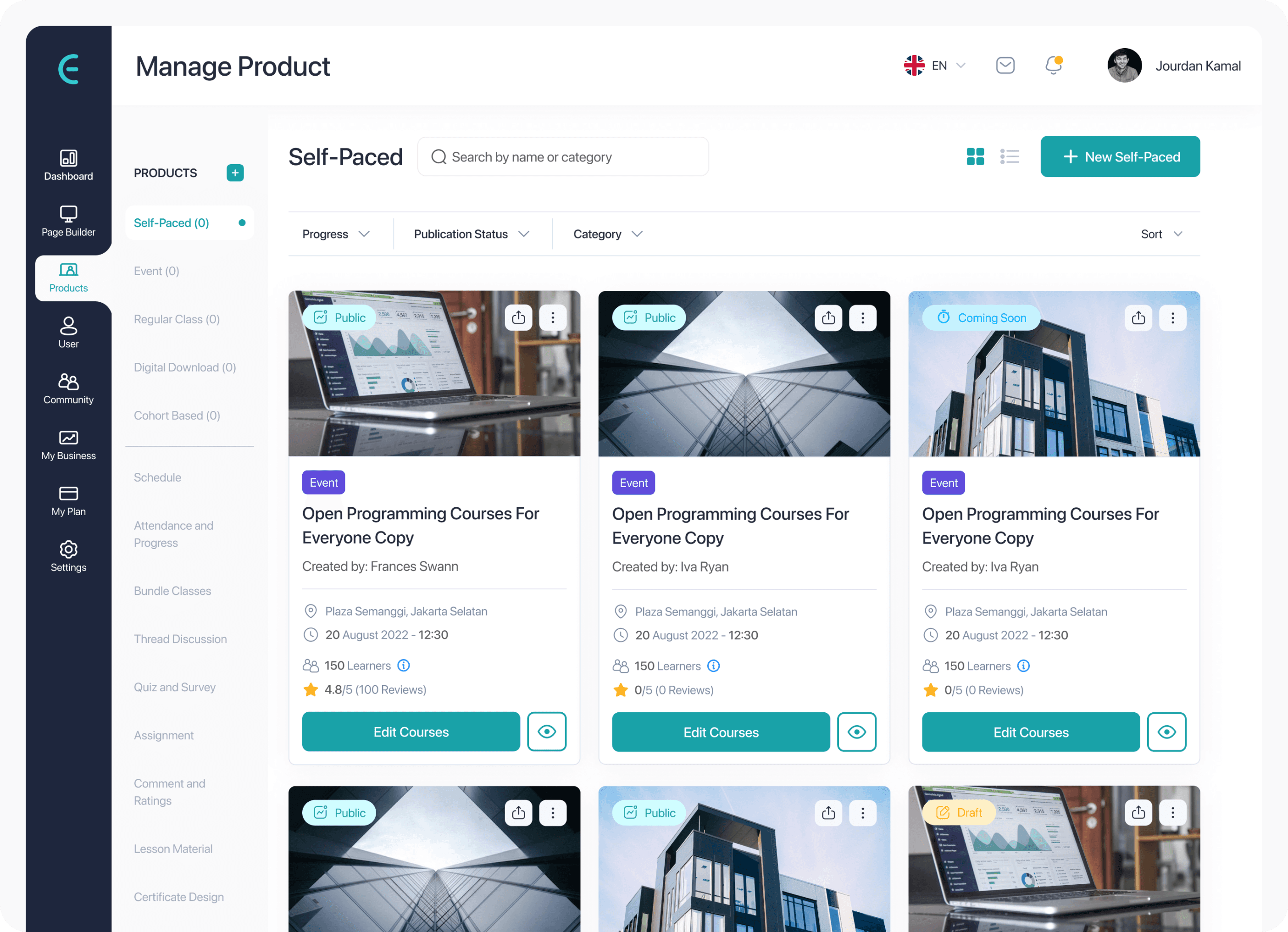
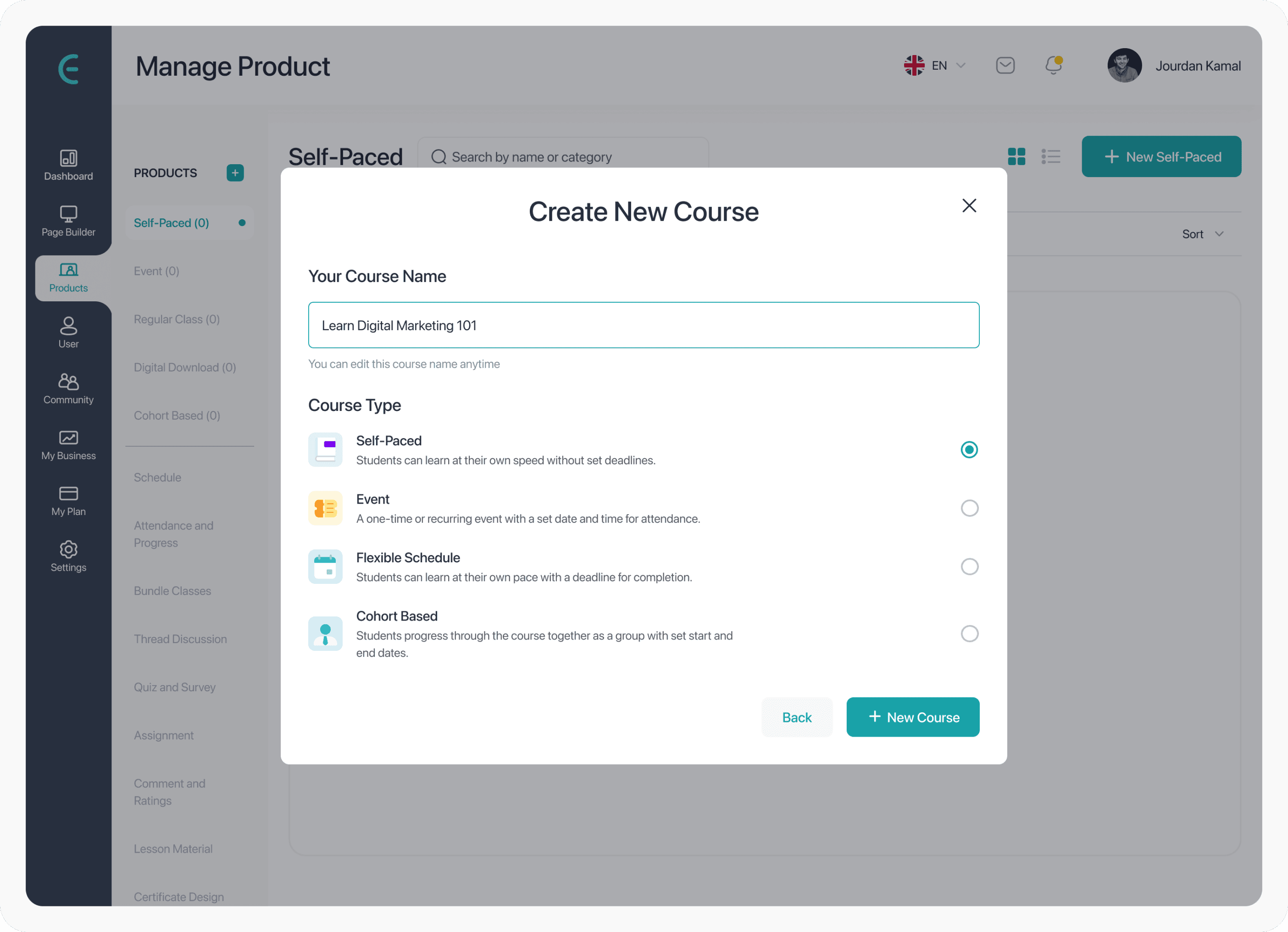
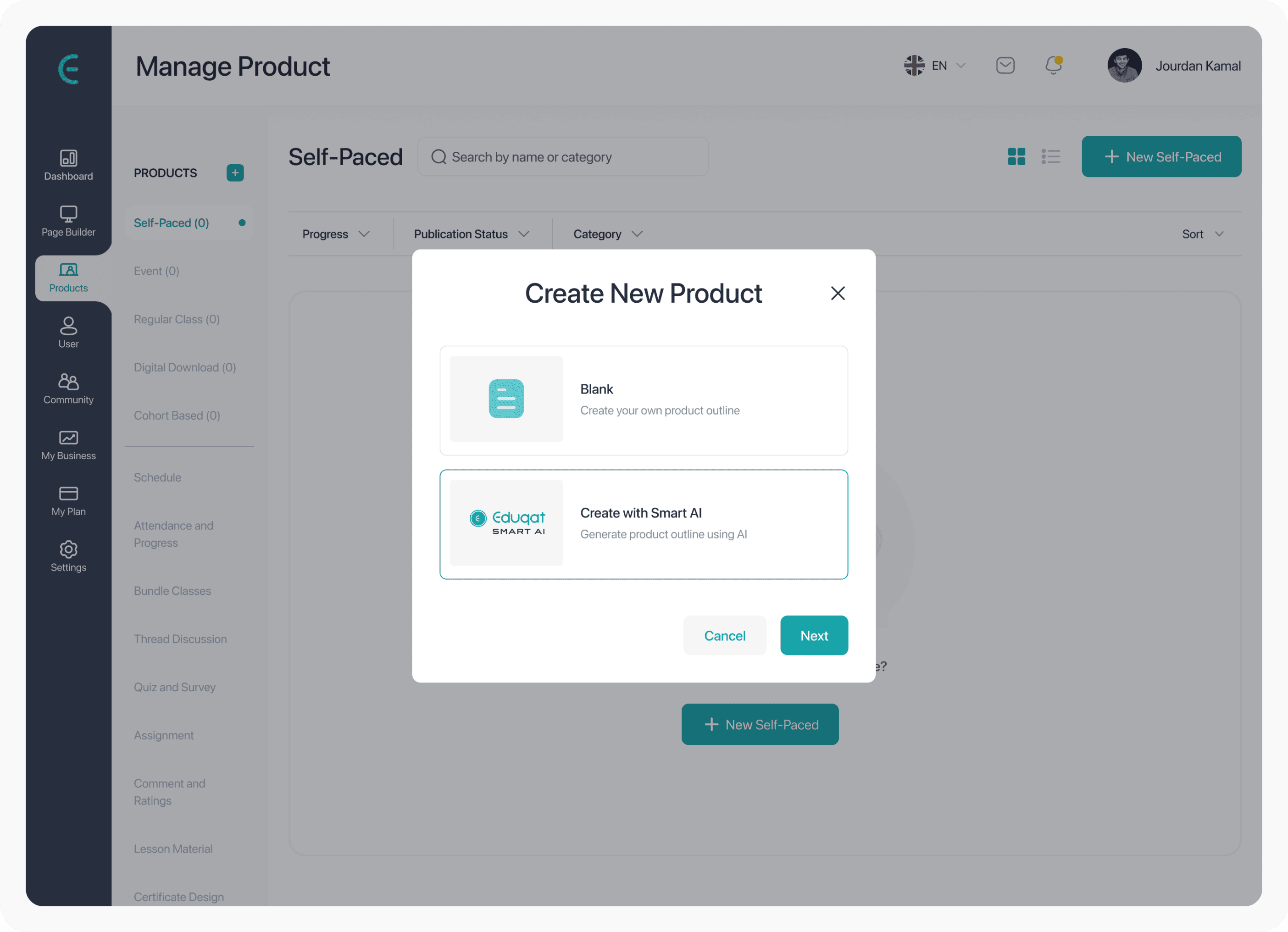
Why it matters: 87% of users in testing expected primary action at top-level. Giving both paths equal prominence removed the implicit assumption that blank was the "default" way to start.
UI Screen 02 - AI Prompt Input
Constrained form, not a chat prompt
Two fields only: chapter count and complexity level. No free text. The PM wanted a free-text prompt like ChatGPT. I argued predictable output > impressive interface when predictability builds trust at first use.
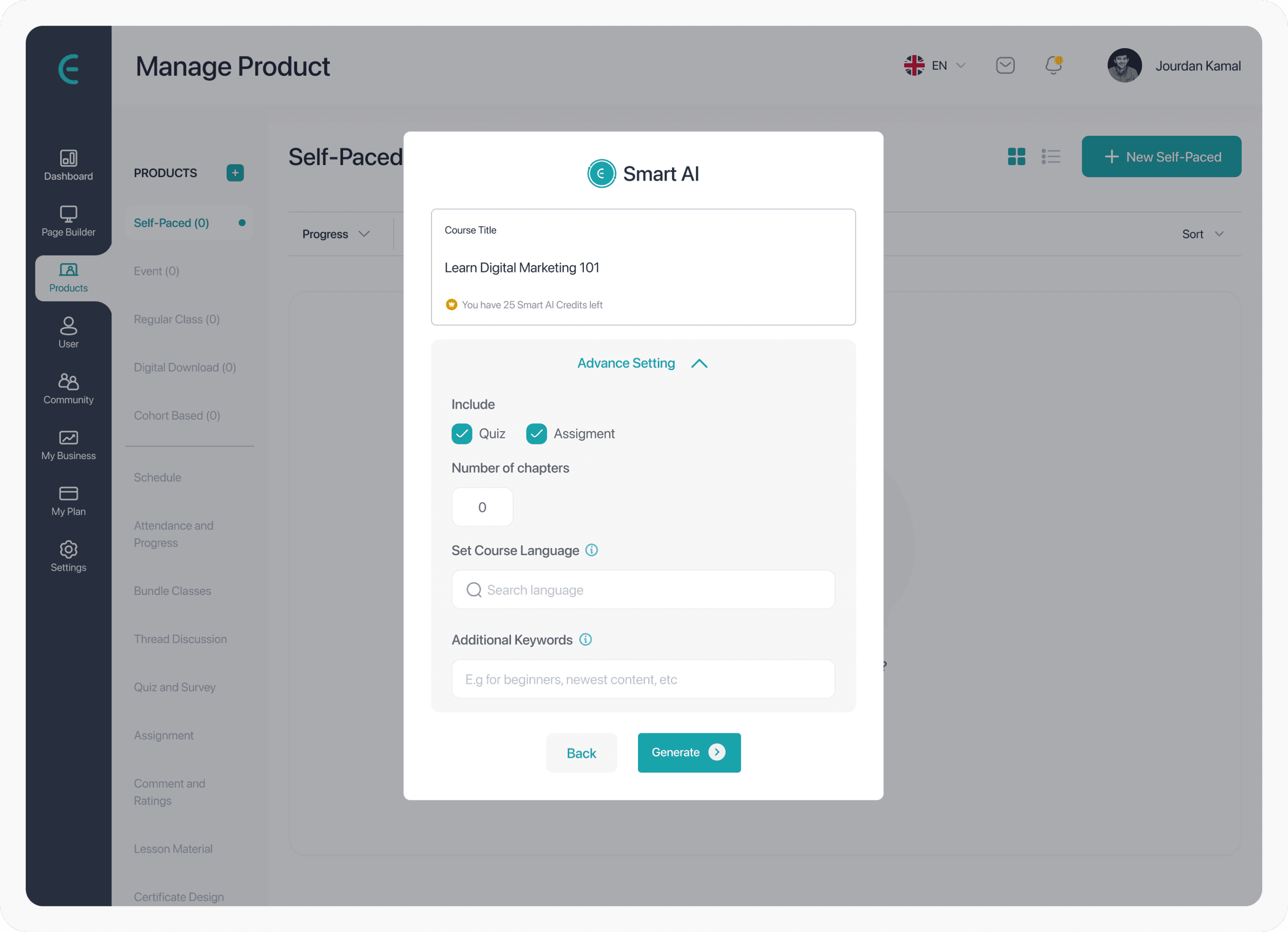
Iteration evidence: V1 used a text prompt with output varied wildly. V2 switched to structured fields. Task completion improved. Educators felt "more in control" with fewer options. Improved based on feedback → key hiring signal.
UI Screen 03 - Generated Curriculum Builder
The "draft" signal that reducing pressure to accept
AI output is presented as an editable outline. Every chapter title has an inline edit affordance visible immediately. Visual language: "this is a starting point," not "this is done."
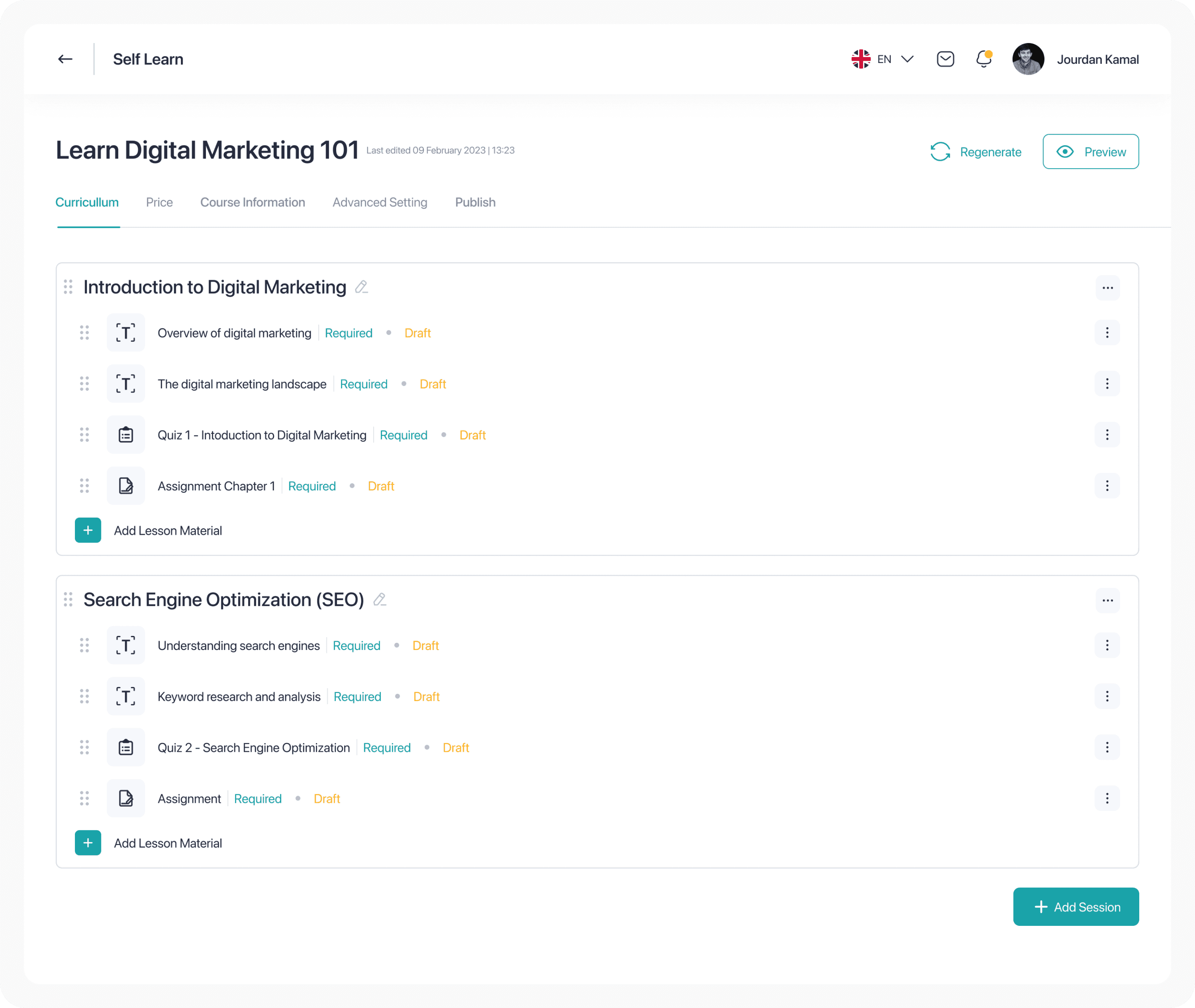
Edge case designed for: AI occasionally returns vague titles like "Chapter 1." We designed a placeholder state that prompts renaming before proceeding — preventing blank structures from going live.
UI Screen 04 - Rich Text + AI Assist
On-demand AI but never proactive
AI suggestions require educator activation. They never interrupt. This was a deliberate constraint that unsolicited suggestions disrupted writing flow and reduced confidence in the tool.
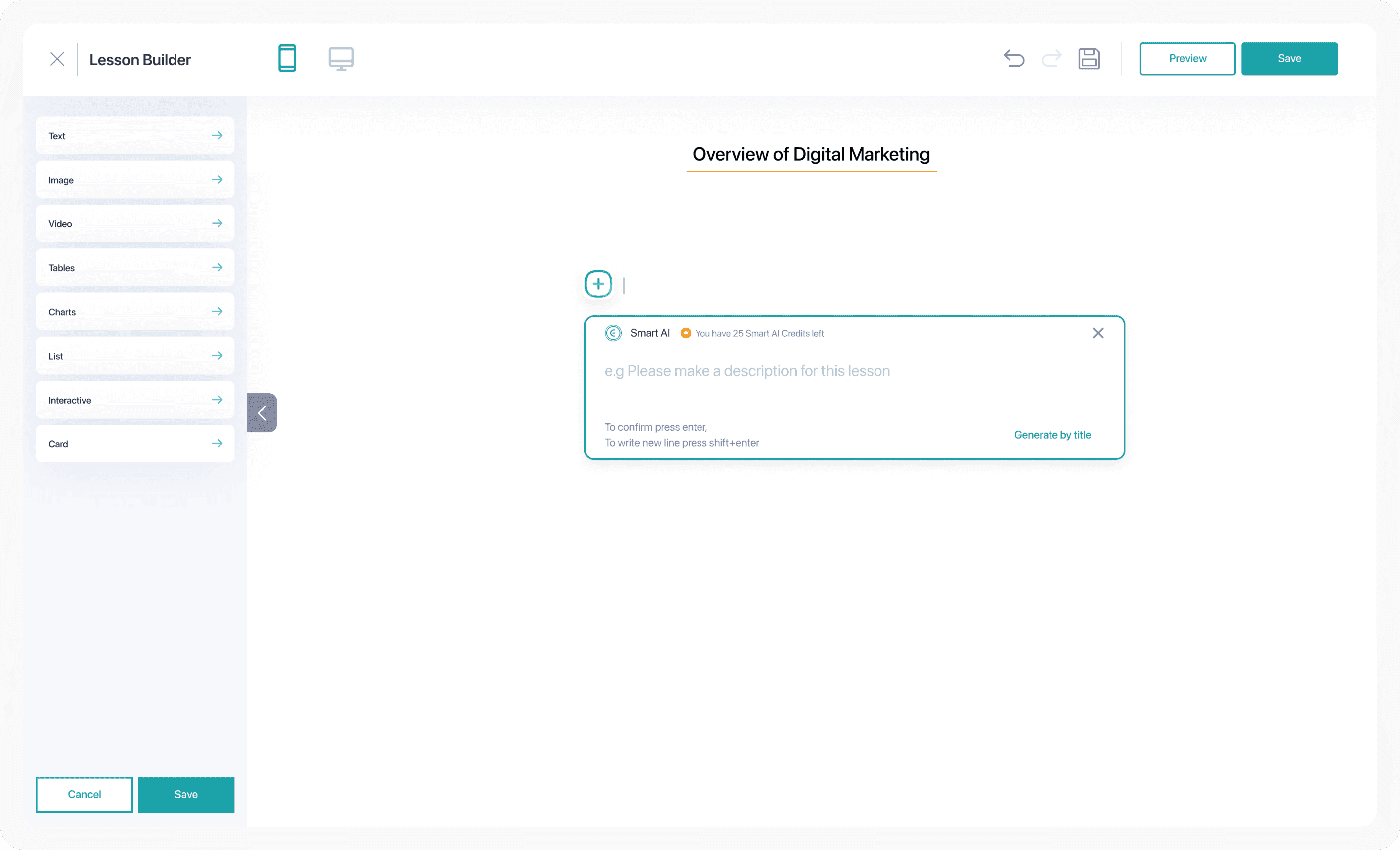
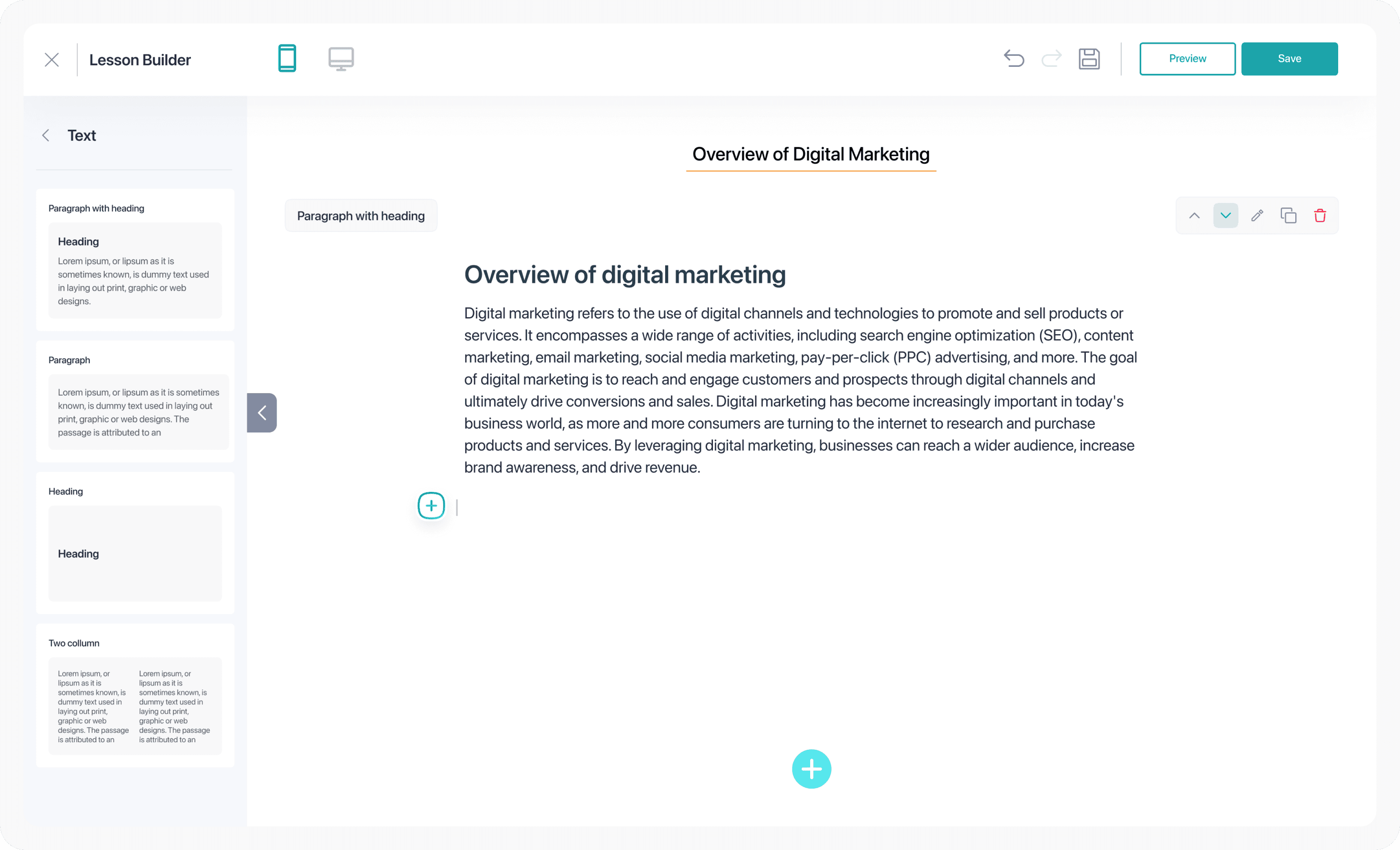
System contribution: The AI rich text assist pattern was proposed as a reusable component across all content-creation flows, not just course creation.
Watch: AI Course Creation Overview on Eduqat (Live)
Published March 9, 2023 on YouTube · UI has since been updated
10 - Battle Story
T-minus two weeks. Leadership wanted to change the core product direction.
“This is where most case studies get vague. I will tell you exactly what the conflict was, what I did, and what I had to give up to protect the decision that mattered.”
The conflict happened at stake
Two weeks before launch, the C-level pushed hard for full AI content generation. The argument: a competitor had just announced similar features, and leadership felt "structure-only" would look limited.
What they were asking for would have required rebuilding the AI prompt logic, redesigning the curriculum review screen, and adding an entire content generation layer that engineering estimated would take at least three additional sprints to build properly.
What I did
I didn't argue the design or defend my creative choices. I reframed the question as a business risk assessment. I pulled up the research synthesis showing what happens to educator trust when AI generates content for them, and I presented the risk in the language the business cared about.
What happened next: The Head of Product and Sr. Product Designer reviewed the research directly. The scope expansion was taken off the table. We shipped what we had designed and it worked exactly the way the research said it would.
The honest trade-off
What I gave up
✕
A more impressive version one announcement
✕
The kind of full automation that wins attention in a competitive market
✕
Some goodwill with the PM who wanted a bigger feature set
What I protected
✓
Educator trust and the feeling that the course belonged to them
✓
A shipping timeline that engineering could actually deliver
✓
A product foundation that could be expanded to full automation in version two.
11 - RESULTS
50-65% workload reduction and 3x faster. Here is exactly how we measured that.
I am showing these numbers with full context including how they were measured and what the limitations were. A metric without context is just a number.
These metrics are based on projections and internal workflow comparison at launch rather than a controlled experiment with a statistically significant sample. Post-launch, we set up proper cohort tracking in production. I am honest about this distinction because overstating the certainty of early metrics is a habit that leads to bad product decisions down the road.
👩🎓
Educator
From post-launch feedback via UAT follow-up
"I set up the entire course structure in under three minutes. That is faster than I have ever moved at the start of a new course. And it still felt like mine when I was done."
🧑💻
Corporate trainer
From post-task debrief during UAT
"I liked that I could edit every chapter. It didn't feel like the AI had decided everything for me. It just gave me a starting point and then got out of the way."
12 - Reflection
Two things I’d change, one that worked better than expected, and three principles I now carry everywhere.
Honest reflection isn’t about saying you’d communicate more. It’s about identifying the specific decision that would have changed the outcome.
What I’d change
1. Involve engineering earlier
Some interactions assumed response times that weren’t technically realistic. Earlier collaboration would have saved redesign time.
Validate with real users before launch
Research was entirely secondary and internal. For a feature this central to platform activation, I would push for a beta rollout with 20–30 real educators before full launch.
What worked best
Reframing the problem early
We stopped asking “How do we generate content with AI?” and asked “How do we remove the starting barrier for educators?”
Principles I carry forward
AI should remove friction, not replace users
Best AI helps users start faster, then gets out of the way.
Predictability builds trust
Reliable systems outperform impressive but inconsistent ones.
Build with engineering early
Shared constraints lead to better product decisions.
BACK TO ALL WORKS
🔥 FEATURED
Product Design • SaaS • eLearning • AI • 2025
Reducing Up to 65% Course Creation Friction with AI-Assisted Structuring
Helping educators move from idea to structured course faster, while keeping full control over their content.
ROLE
Product Designer
timeline
3 - 4 Months
Collaboration
1 PM, 1 Head of Product, 3 Designers, 2 UATs, and 4 Engineers
Ownership
Drove UX for course structuring flow
Go to top