
01 - THE BUSINESS PROBLEM
After AI Course Creation shipped, the next urgent problem was already waiting.
When AI Course Creation launched, educators were building content faster. Platform supply was growing. But within weeks, a pattern emerged on client calls. Almost every conversation eventually circled back to the same question: what about assignments?
Assignments were central to how educators ran their courses, and managing them at scale was one of the most time-consuming parts of their workflow. Creating them from scratch, defining grading criteria, and evaluating hundreds of submissions manually was unsustainable. The platform had no AI support for any of it.
the trigger
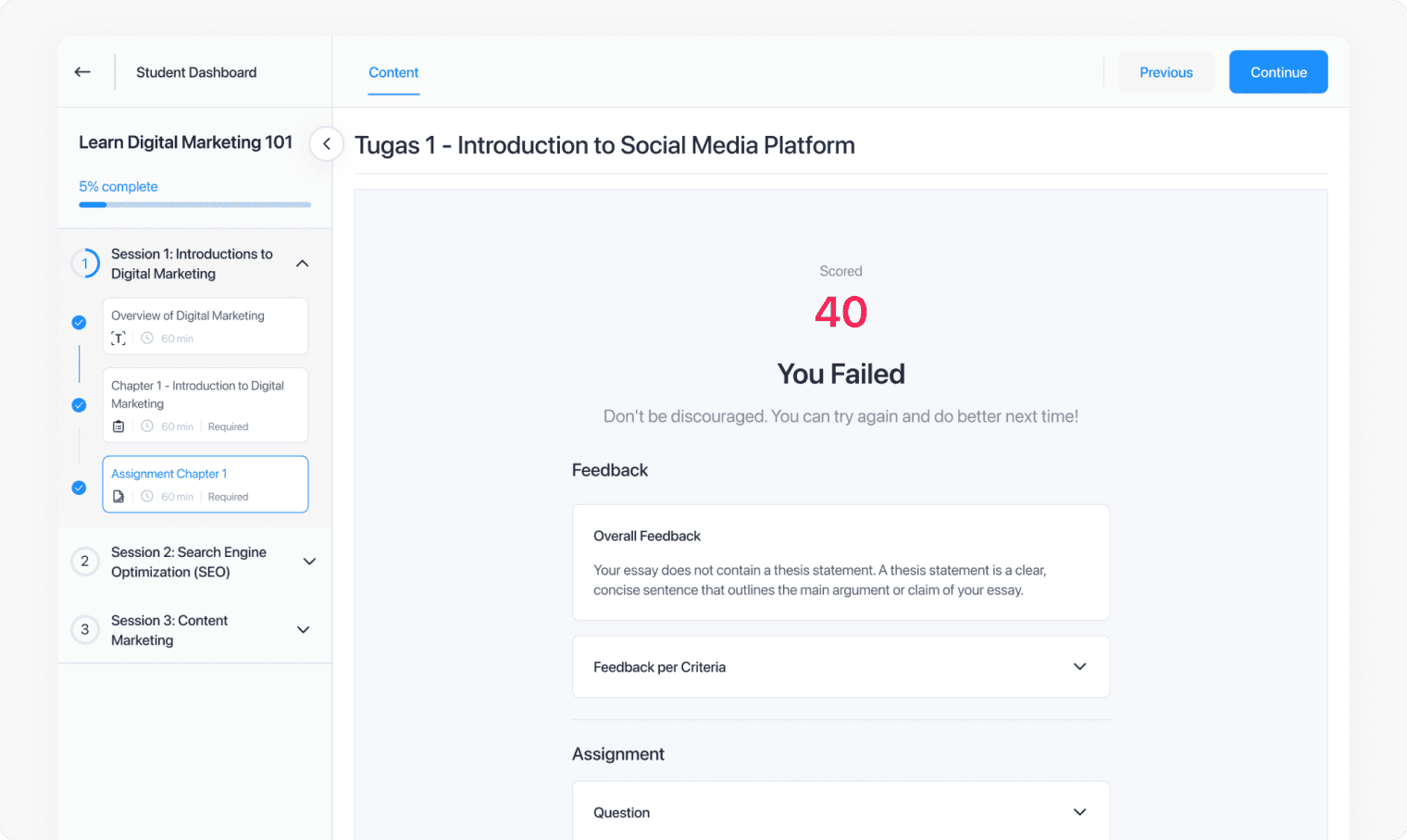
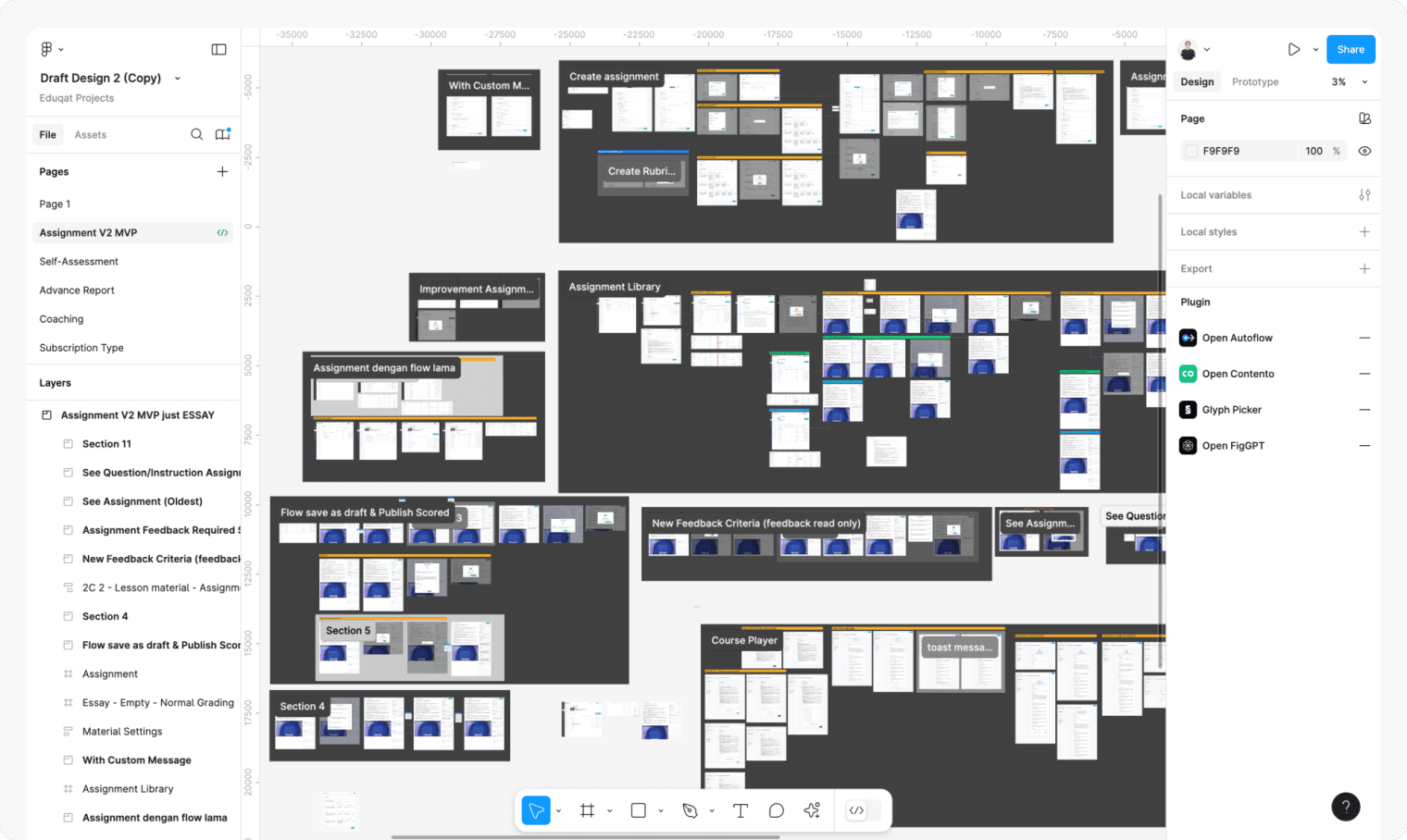
Where the stakeholders disagreed
Three different groups had three different ideas about what we were building, and I was in the middle of all of them throughout the entire project.
Clients actively requesting AI assignment support
No scalable way to give quality feedback
Inconsistent rubrics across educator teams
Full automation push
✕
Some stakeholders wanted AI to grade and close submissions automatically
✕
Business team wanted something impressive for enterprise demos
✕
PM had pressure to position this as a clear competitor differentiator
Educator-in-the-loop approach
✓
Research showed educators needed confidence in grades before releasing them
✓
Students expected feedback that felt considered, not generated
✓
Engineering flagged AI grading accuracy as a real constraint at MVP stage
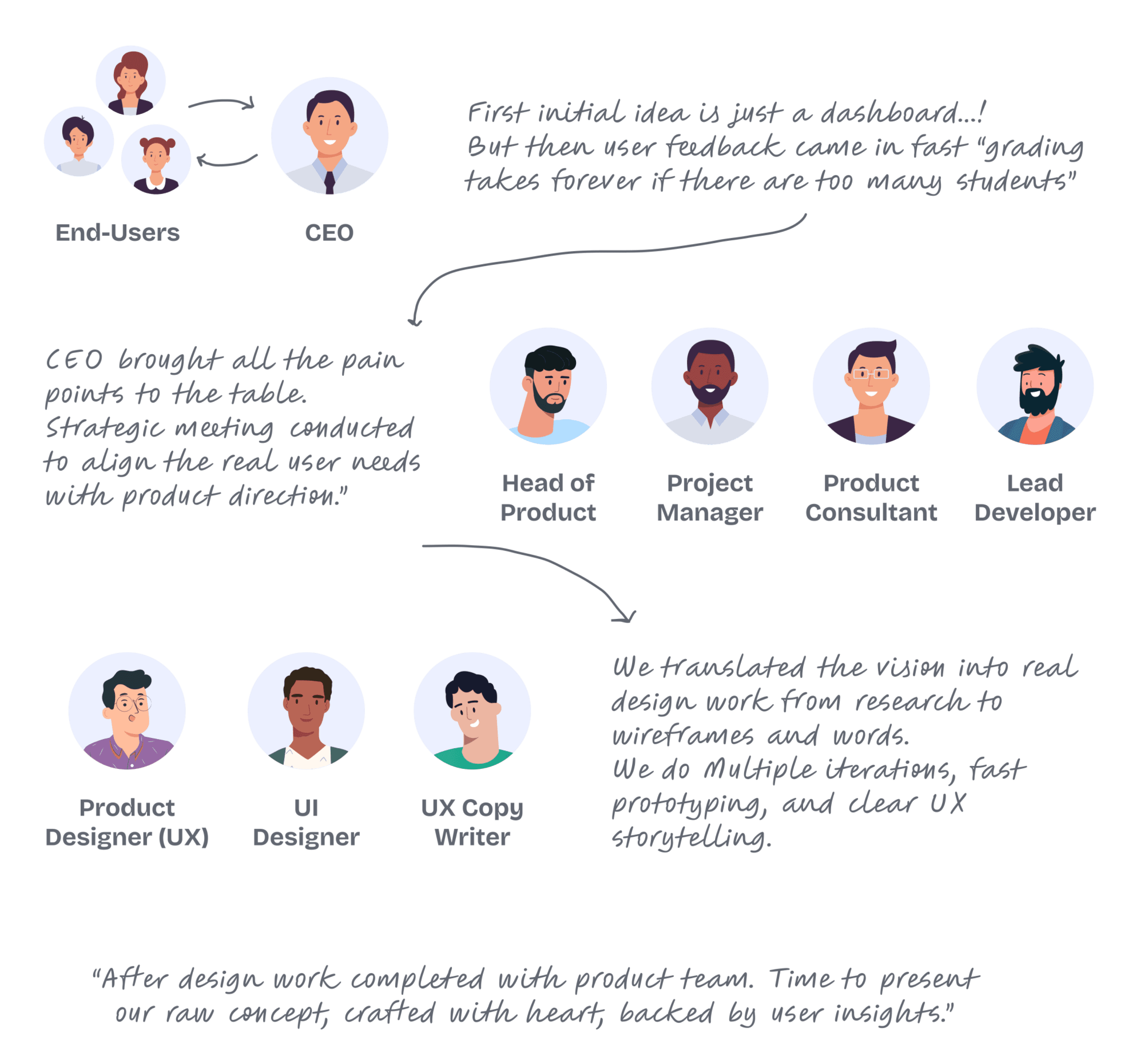
CEO insights to leadership meeting to product team synthesis. Strong top-down momentum from day one.
02 - BRIEF VS REALITY
The brief said automate grading. The reality was more complicated than that.
The original ask was straightforward on the surface. But when I mapped what educators actually did during grading, the real problem became much clearer and it was not the grading itself.
The surface-level brief
“Build an AI system that creates assignments, generates rubrics, and grades submissions automatically so educators don't have to do it manually.”
When I synthesized stakeholder feedback and mapped the real educator workflow, I found something unexpected. The grading step that everyone was focused on automating was not where the time was being lost. The biggest friction was upstream, for example: creating the assignment and defining what a good answer looked like before any submissions arrived.
The situation is Educators were slow at grading not because evaluation itself was hard, but because they had no structured framework to grade against. They were building that framework from scratch in their heads right before they started. That was the real bottleneck.
The reframed problem
What changed because of that reframe
Instead of putting everything into automated grading, we designed the system to do three things well: help educators create well-structured assignments quickly, generate rubrics automatically so evaluation criteria existed before grading began, and then use AI to evaluate submissions against those rubrics with the educator in control of the final call.
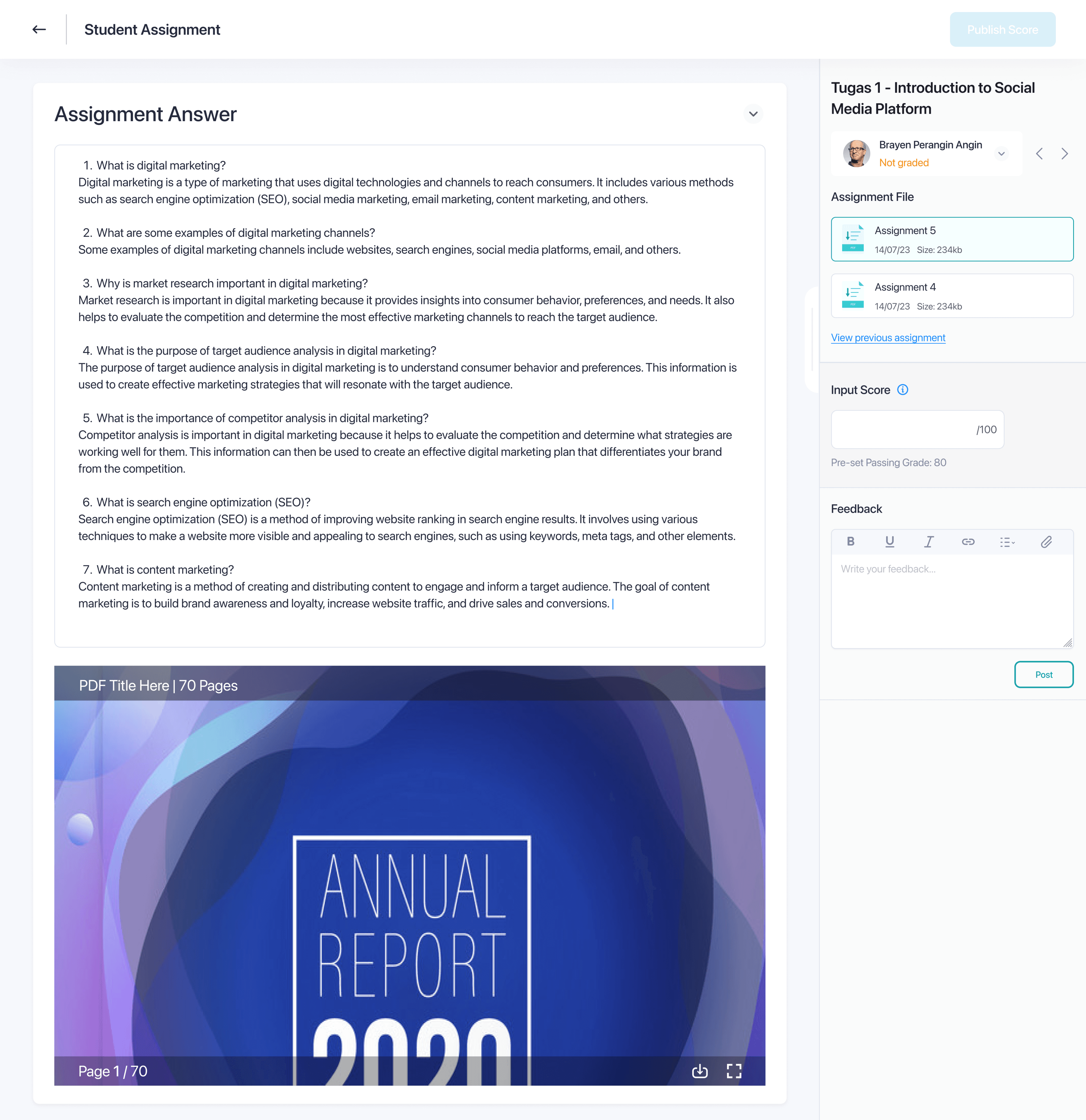
Image: Eduqat - assignment feature for MVP 1.2 before AI integrated was developed
03 - Root cause
No competitor had built this before. We were mapping the territory as we walked through it.
Why this was genuinely uncharted
Most AI features in edtech at the time were focused on content generation or course recommendations. Nobody in the independent course platform space had combined AI assignment creation, rubric generation, AI grading, and human validation into one coherent workflow. That meant we had no existing product to learn from, no pattern to borrow from, and no benchmark to test against for this specific capability combination.
The real implication
Questions we had to answer before any wireframe opened
QUESTION 1
How much should AI generate versus how much should educators write?
→ Full generation risked ownership loss. Partial generation required defining exactly where the line was.
QUESTION 2
What happens when the AI grades something incorrectly?
→ Before rubrics existed, early AI grading would sometimes go off-context entirely. The system needed a structured anchor to grade against.
QUESTION 3
How do educators verify that AI feedback is fair to students?
→ Students initially experienced AI feedback as generic and impersonal. Human validation before release became the answer.
QUESTION 4
What controls do educators need to trust the system with professional decisions?
→ Educator accountability for grades is legal and ethical, not just preferential. The design had to reflect that.
So, here are the business goals
04 - DISCOVERY & EVIDENCE
The time problem was well documented. The trust problem was not.
“Secondary research validated the pain points from stakeholder synthesis. The more meaningful finding was about what students actually needed from feedback and how rarely they were getting it under the manual system.”
So that's why the grading time problem must be well documented
It because of the assessment and feedback account for between 30 and 40 percent of an educator's total working time in higher education and professional training contexts. For large courses with hundreds of students, that number climbs higher. Eduqat's educator base was no exception.
Let's see the data below
40%
Of educator work time spent on assessment
63%
Of students say feedback arrives too late to act on
4x
More likely to complete a course with immediate feedback
71%
Of educators report grading inconsistency as a real concern
The student data mattered as much as the educator data. Students who received feedback days after submitting had already moved on mentally. The learning window was closed. Faster grading was not just about educator efficiency, but also it was about whether feedback could arrive while it was still useful.
Three directions that came out of the research
1
Rubric-first, always as the mandatory prerequisite before any grading
Without a rubric, AI assessment was unreliable and went out of context. With one, it became consistent and auditable. Rubric generation as the mandatory first step was both a design decision and a quality guarantee.
2
AI-assisted feedback with full educator override
The AI generates a feedback draft. The educator reads it, edits any part, and can add personal context the AI could not know. The result reaches students as the educator's feedback because by the time it does, the educator has approved it.
3
Full autonomous grading, planned for after trust was established
Educators were not ready to delegate final grade decisions to AI in MVP. We put full autonomy on the post-launch roadmap and kept the first version focused on building the trust architecture that would make it possible later.
05 - COMPETItion
No competitor had the full AI creation lifecycle in one flow. That was the opening.
I benchmarked five leading edtech platforms to understand what had been built, what was missing, and where Eduqat could genuinely differentiate rather than just catch up.
Platform
AI Assignment
AI Rubric
AI Grading
AI Feedback
Google Classroom
Partial
No
No
Yes
No
Thinkific
Partial
No
No
Yes
No
Kajabi
No
No
No
Yes
No
Teachable
No
No
No
Yes
No
Learnworlds
Partial
No
No
Yes
No
Eduqat (Target)
Yes, full
Yes, full
AI-Assisted
Yes, full
Personalized
No competitor in the independent course platform space combined assignment creation, rubric generation, AI grading, and personalized feedback in one integrated workflow. The real gap was not a feature, but a philosophy:
“Designing AI that educators can inspect, adjust, and genuinely own.”
06 - DESIGN DIRECTION
Three principles written before any wireframe opened. They made every subsequent decision easier to defend.
These were shared with the team before design work began and referenced throughout the project whenever a decision was contested. Stakeholders who wanted to keep changing the structure were anchored back to these to protect the timeline and keep improvisation space for post-launch iterations.
The design mandate
The three directions we considered
Rubric-first, always
→ Rubric generation is the mandatory first step before any submission can be graded. A small slowdown at the rubric stage means much faster, more consistent evaluation downstream and it forces educators to think about what they are evaluating before they start evaluating it.
AI proposes, educator disposes
→ Every AI generated output, including assignment drafts, rubric criteria, scores, and feedback text, is treated as a draft for educators to review. Nothing reaches students without human oversight. This principle is reinforced through the visual design. AI outputs are styled to clearly signal “review me,” not “final.”
Transparency over impressiveness
→ We chose not to make the AI feel like magic. When the system assessed a submission, it showed which rubric criteria were met, which were not, and with what confidence. An AI that shows its reasoning is one educators can trust. An AI that just shows a score is a black box, and black boxes don't get used for things that matter.
07 - HOW IT WORKS
Three flows. Every path ends with an educator making the final call before a grade reaches a student.
“The same design principle runs through all three flows: AI does the heavy work, the educator owns the outcome.”
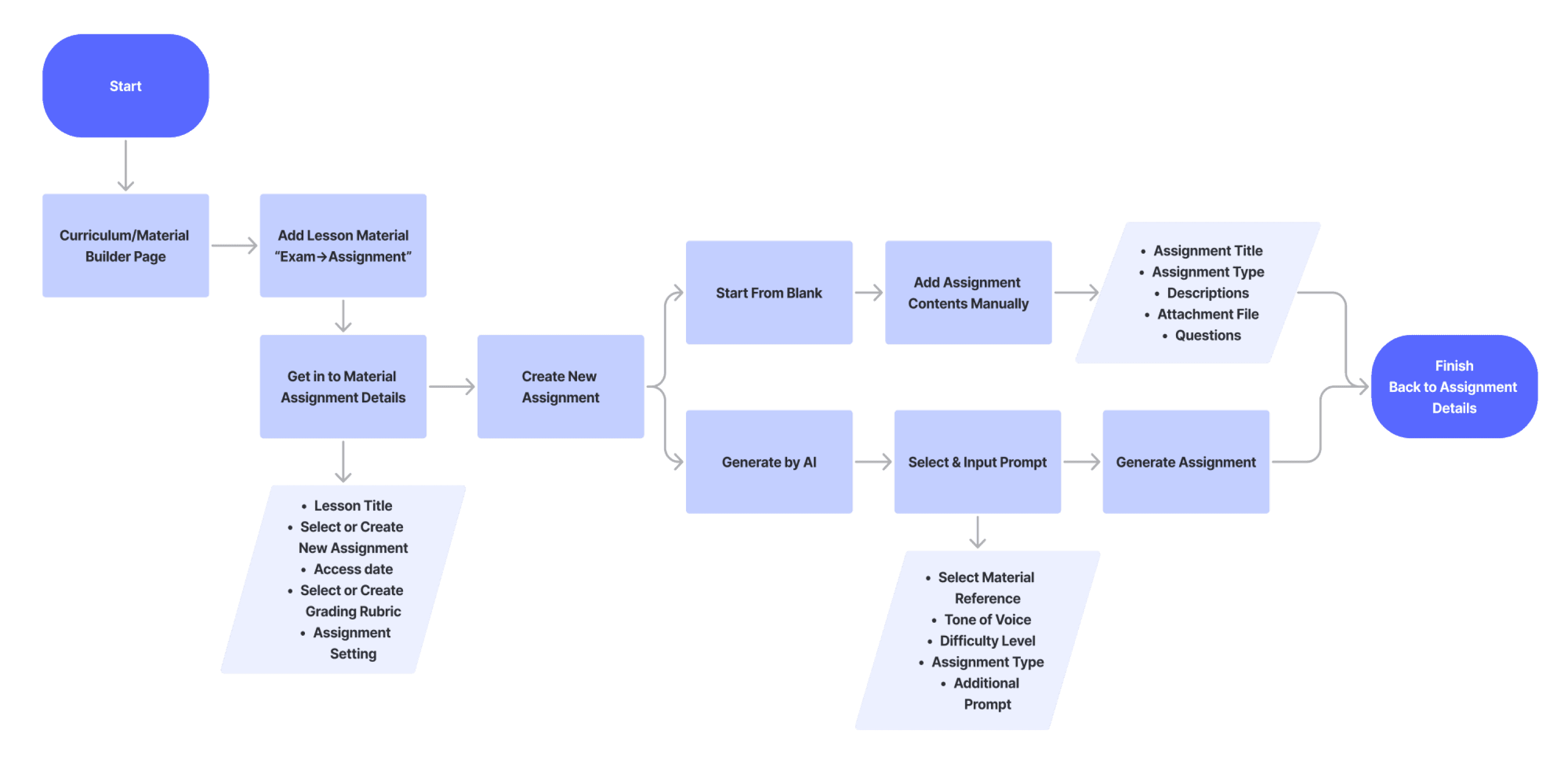
Flow 1 - Create Assignment
These were shared with the team before design work began and referenced throughout the project whenever a decision was contested. Stakeholders who wanted to keep changing the structure were anchored back to these to protect the timeline and keep improvisation space for post-launch iterations.
Flow 2 - Create Grading Rubric
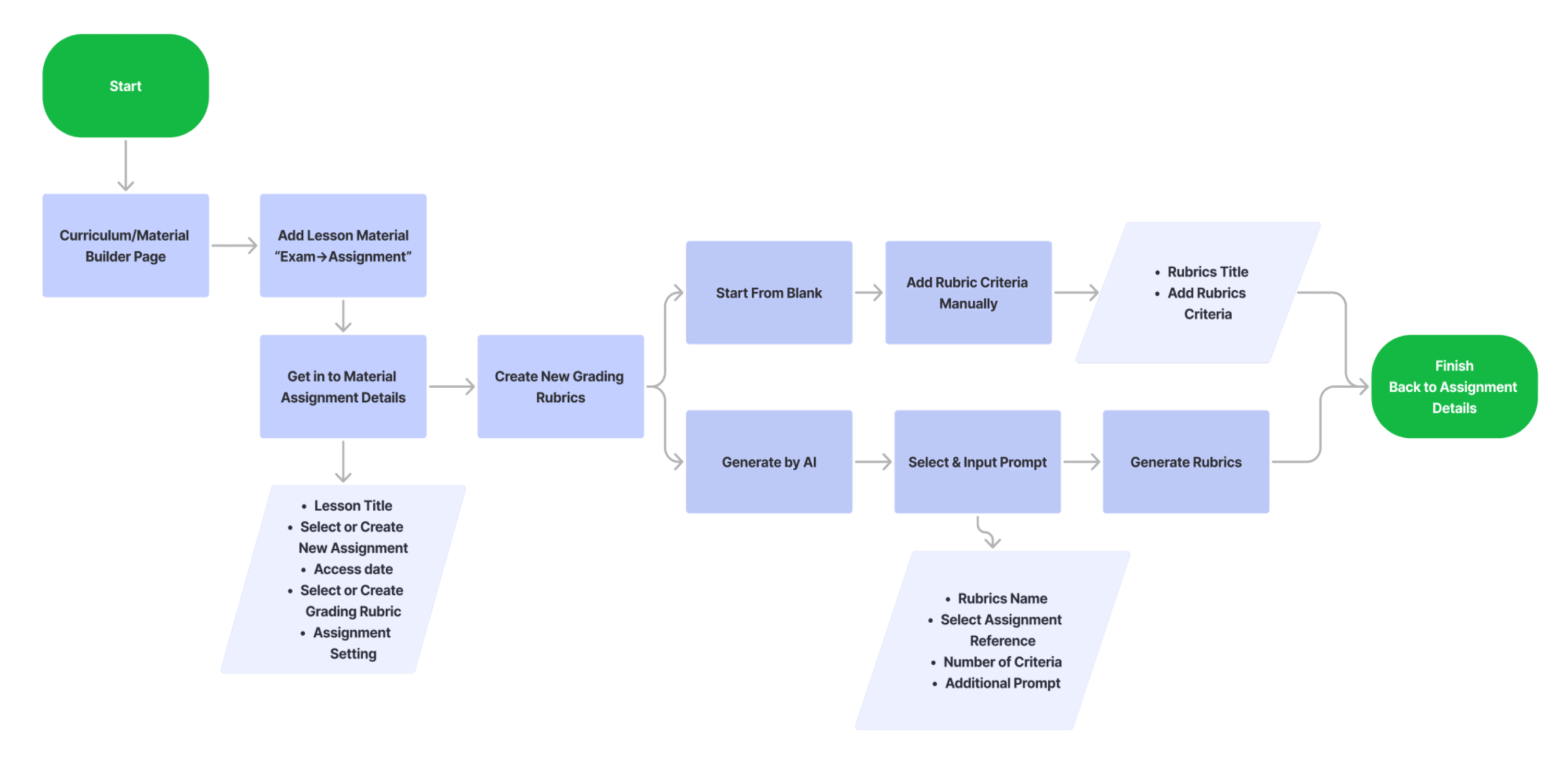
On the Assignment Details page, the educator adds a grading rubric. With AI assistance, they provide a rubric title, a reference assignment, the number of grading criteria, and any additional notes. The AI generates the rubric. The educator reviews and adjusts criteria weights and descriptions before saving. At this stage they can also enable Auto Grading and configure Feedback Settings.
Flow 3 - Assignment Grading Dashboard
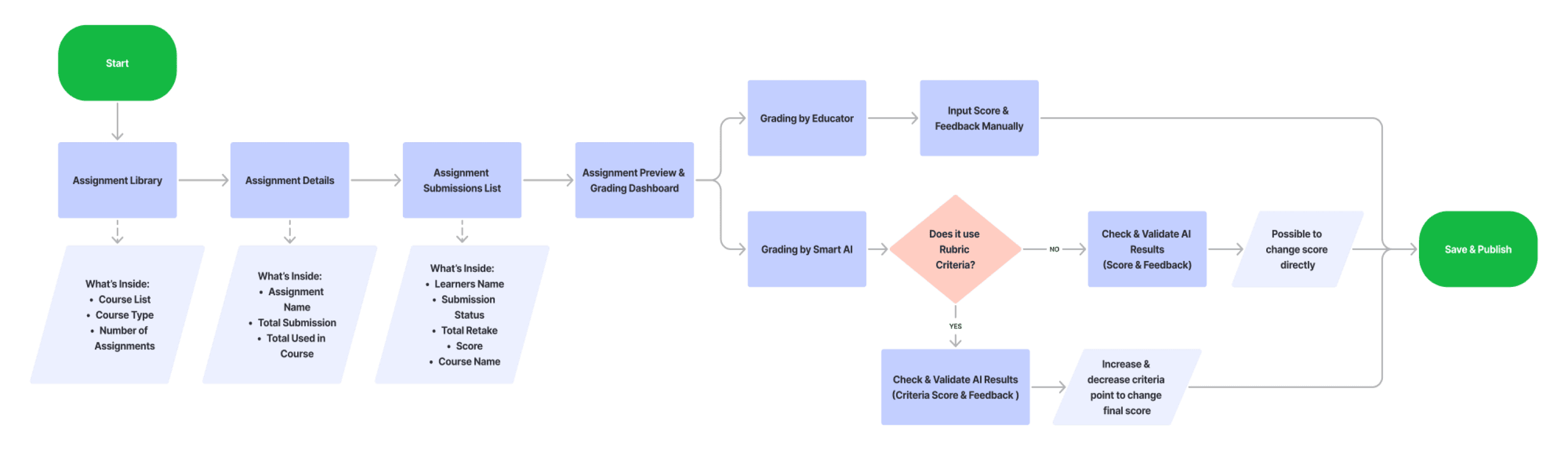
The educator navigates to the Assignment Library, selects a course, picks an assignment, and opens a student's submission. If Auto Grading is enabled, the AI fills in the score and feedback based on the rubric. Before publishing, a confirmation modal requires the educator to review and validate. Nothing reaches a student without that final approval step.
08 - KEY DESIGN DECISIONS
Every real design decision has something you gave up. Here are the three that defined this product.
“These were not obvious choices. Each one involved competing stakeholder goals, real constraints, and a trade-off I had to be willing to defend with evidence rather than preference.”
Decision 1 - Core Grading Model
AI-assisted grading with mandatory educator review
Most Critical
Situation
Educators did not trust fully automated grading, while stakeholders pushed for maximum automation.
What We Choose
AI generates grades and feedback, but educators must review and approve before release.
Why This Matter
Educators are accountable for grades, so human oversight is required for trust and adoption.
What I Gave Up
A more impressive fully automated experience that would perform better in demos.
Decision 2 - Rubric Generation Timing
Rubric must be defined before any submission can be assessed
Situation
Educators were used to starting grading first and defining criteria later.
What We Choose
Require rubrics to be defined and approved before any grading begins, with AI assisting creation.
Why This Matter
Consistent criteria across all submissions is essential for fair and defensible grading.
What I Gave Up
Flexibility to adapt criteria during the grading process.
One moment where I pushed back directly
The stakeholders wanted to add a one click "approve all" button to bulk-release all AI assessed submissions without individual review. The argument was that when educators trusted the AI's assessments overall, making them click through each one was unnecessary friction.
What I Did
I pushed back with two arguments. First, bulk release without any review exposed Eduqat to real liability if AI errors reached students at scale. Second, the friction was intentional requiring at least a scan of the AI's work before release was the accountability mechanism that made the whole system trustworthy.
🎥 A Glimpse Into the Future
See how AI features are shaping the way educators work faster, smarter, and intuitive.
09 - THE SOLUTION
Every screen annotated with the reasoning and why it works the way it does.
At Eduqat, wireframes are built in the existing design system at near-final fidelity from the start. Because this feature required new components outside the existing library, the development team had to build several from scratch based on our Figma specs adapted from competitor patterns but rebuilt in Eduqat's visual language.
Eduqat Assignment Feature Before AI
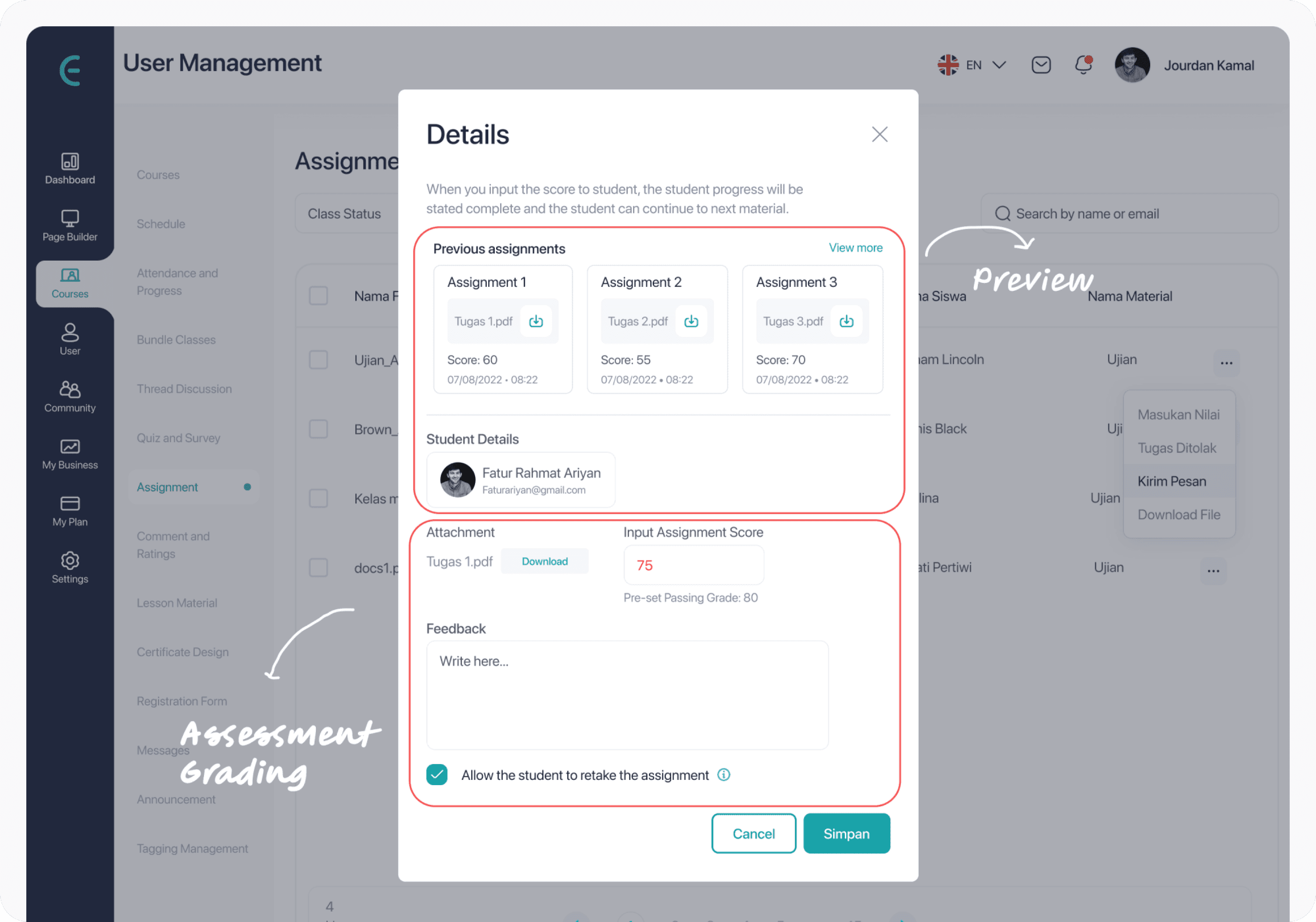
MVP 1 - Before AI Assisted ready
Assessment is Only From a Pop up
MVP 2 - Before AI Assisted ready
New Design But It's Just Assessment Dashboard Without AI
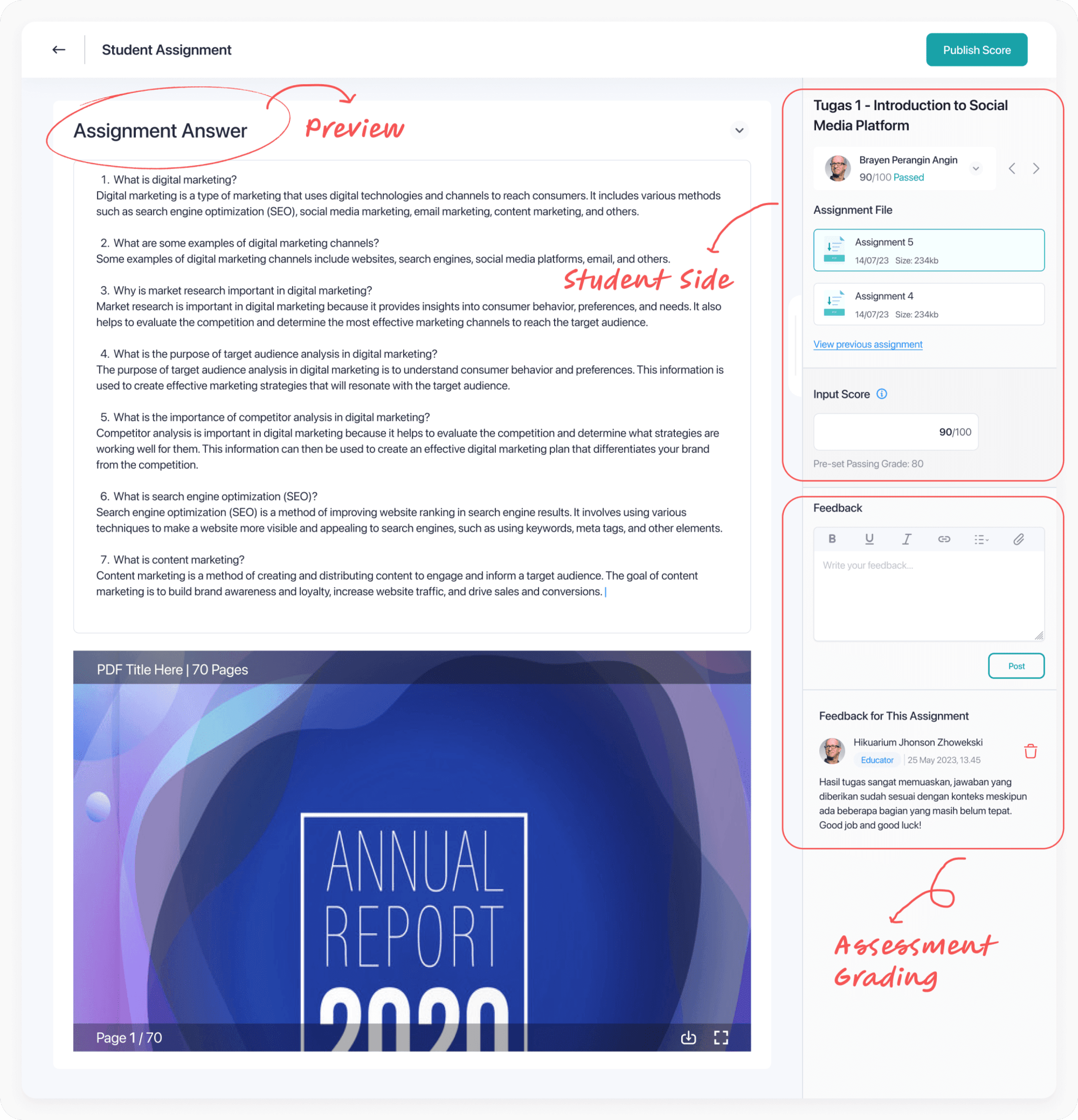
Now, here is the MVP 3 after AI Assisted ready | Section 1 - Create AI Assignment
Screen 1 and 2
From curriculum builder to the assignment hub
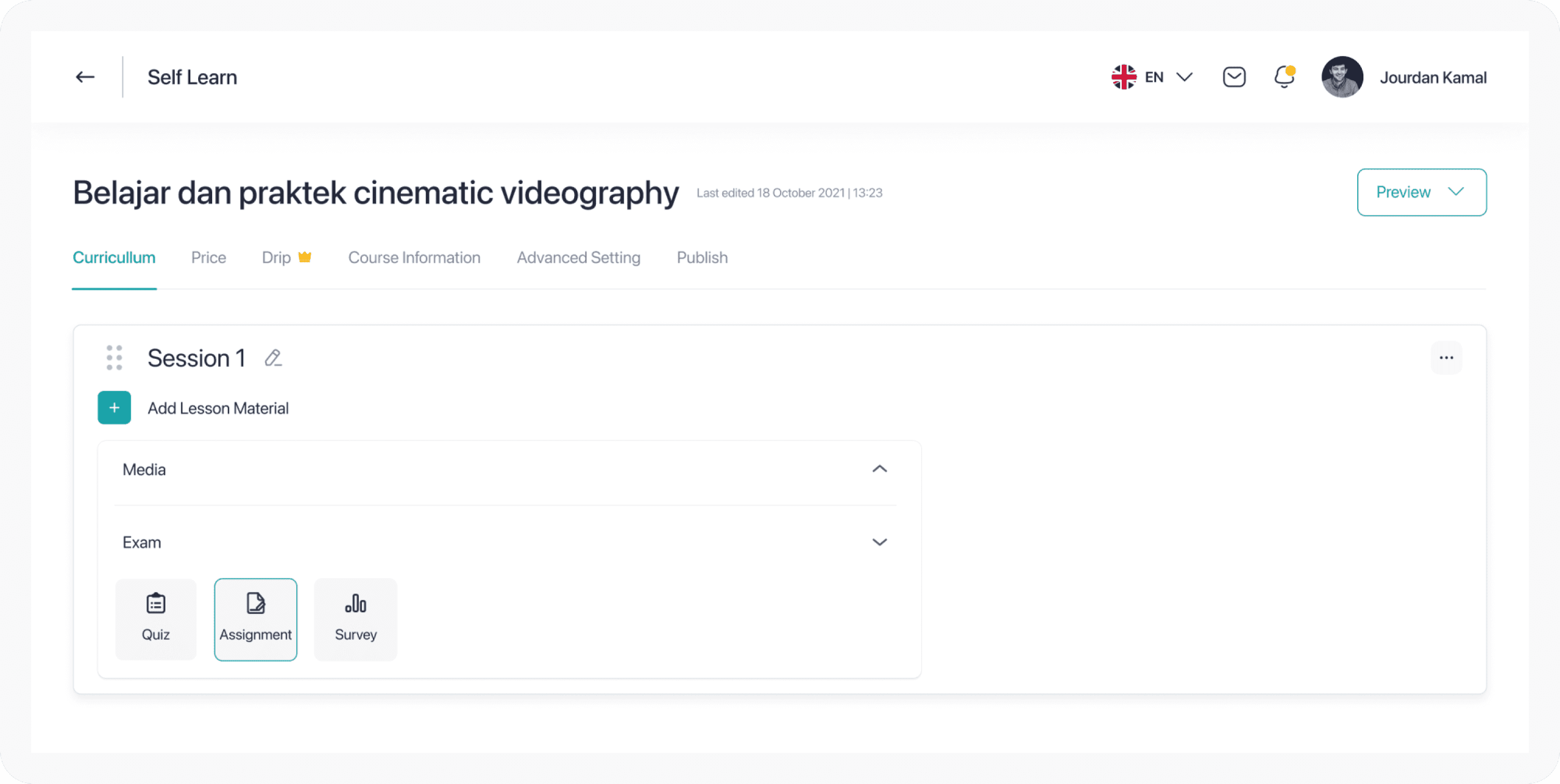
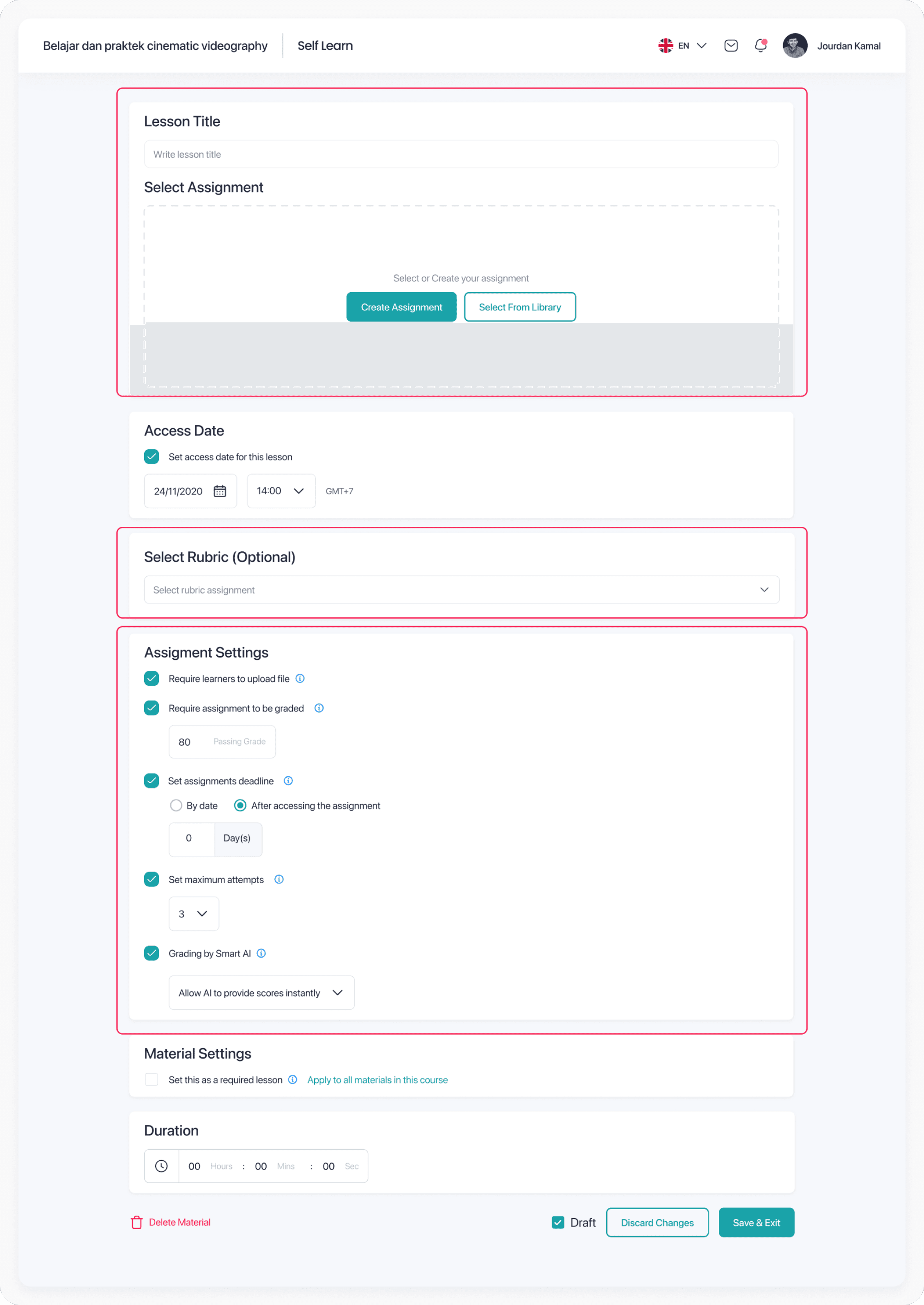
The educator navigates to the curriculum builder, selects Exam, then chooses Assignment Material. This takes them to the Assignment Details and Settings page and the hub where assignment content, rubric setup, and all settings including AI grading come together in one view.
Screen 3 to 5
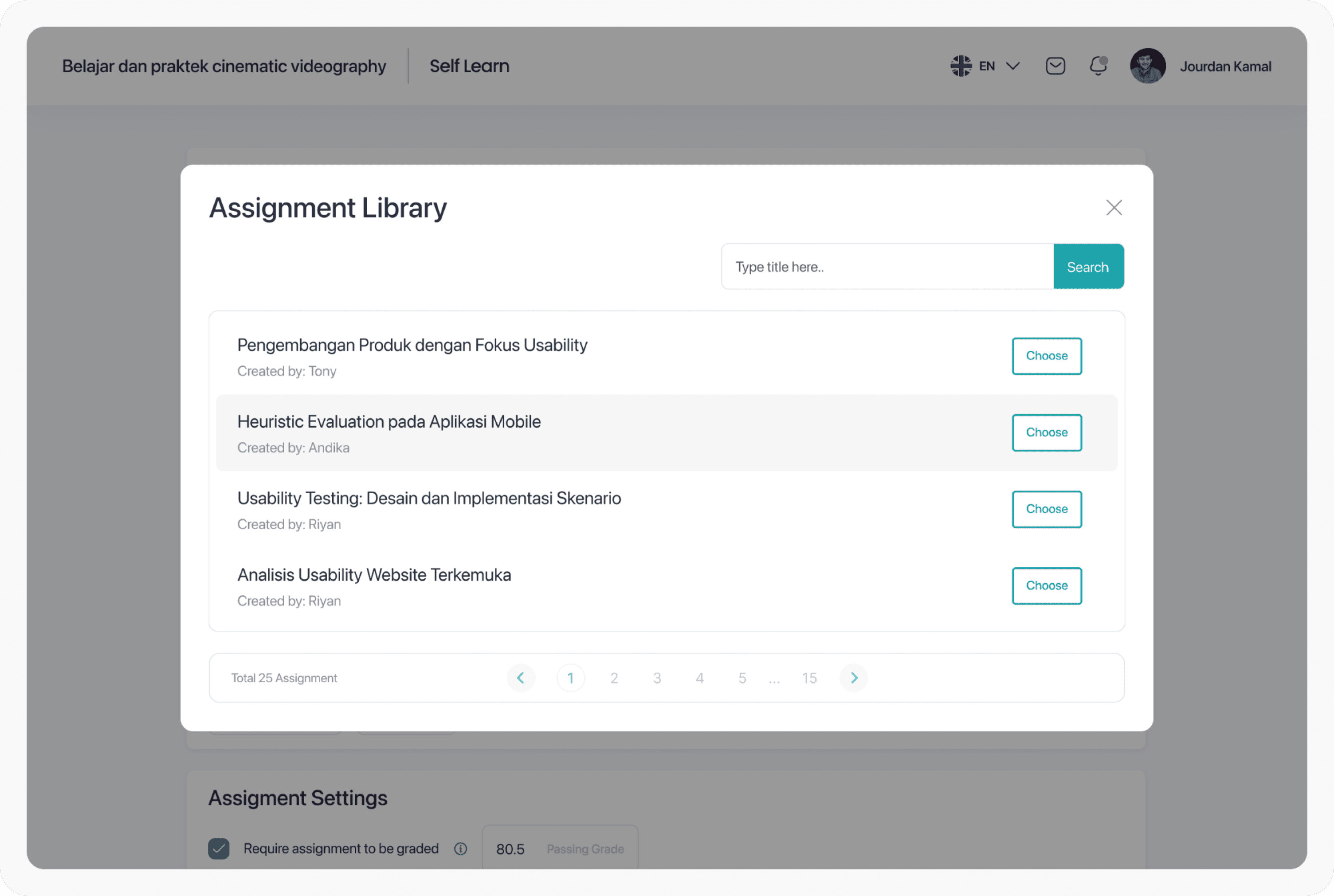
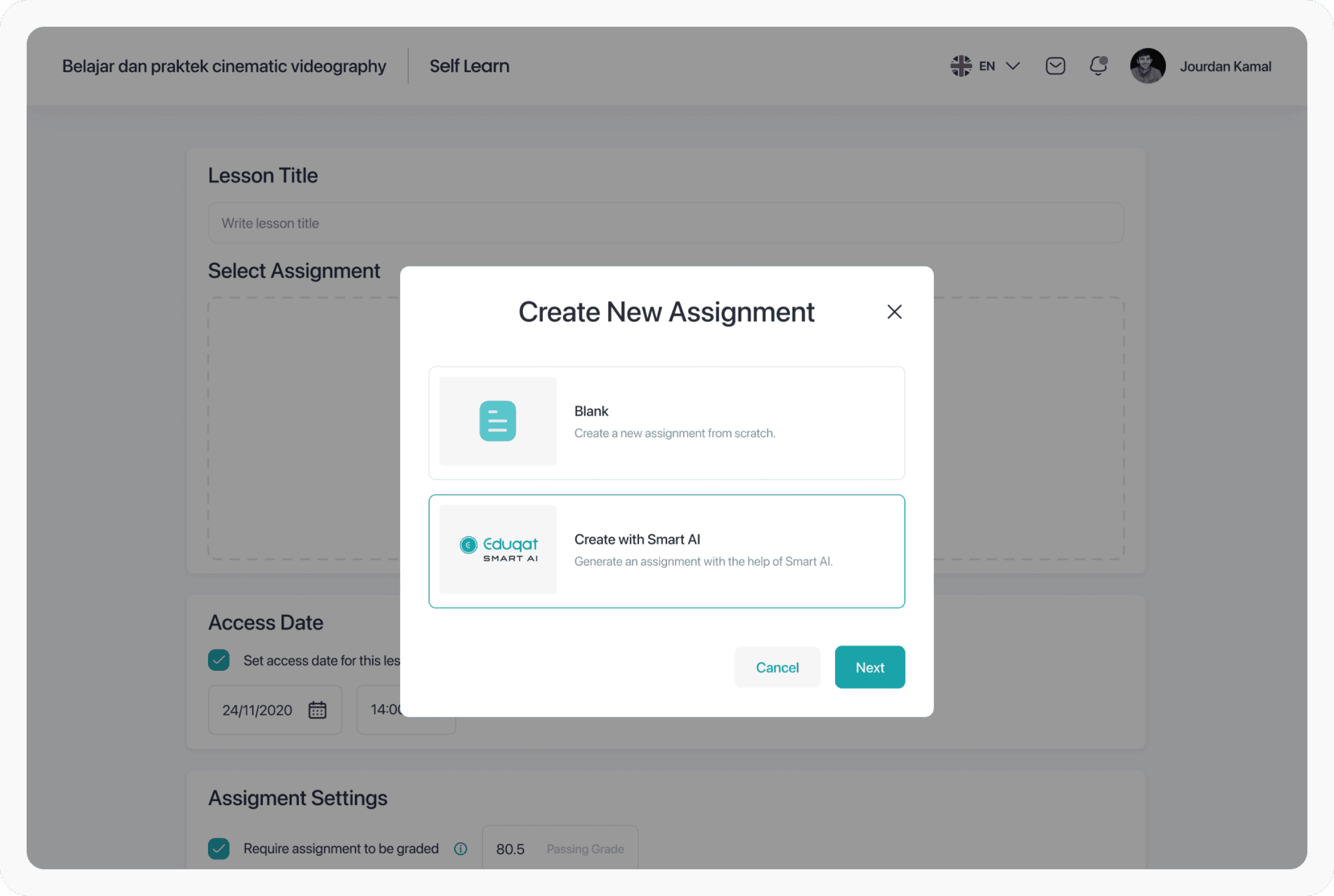
Reuse what exists, or generate something new with AI
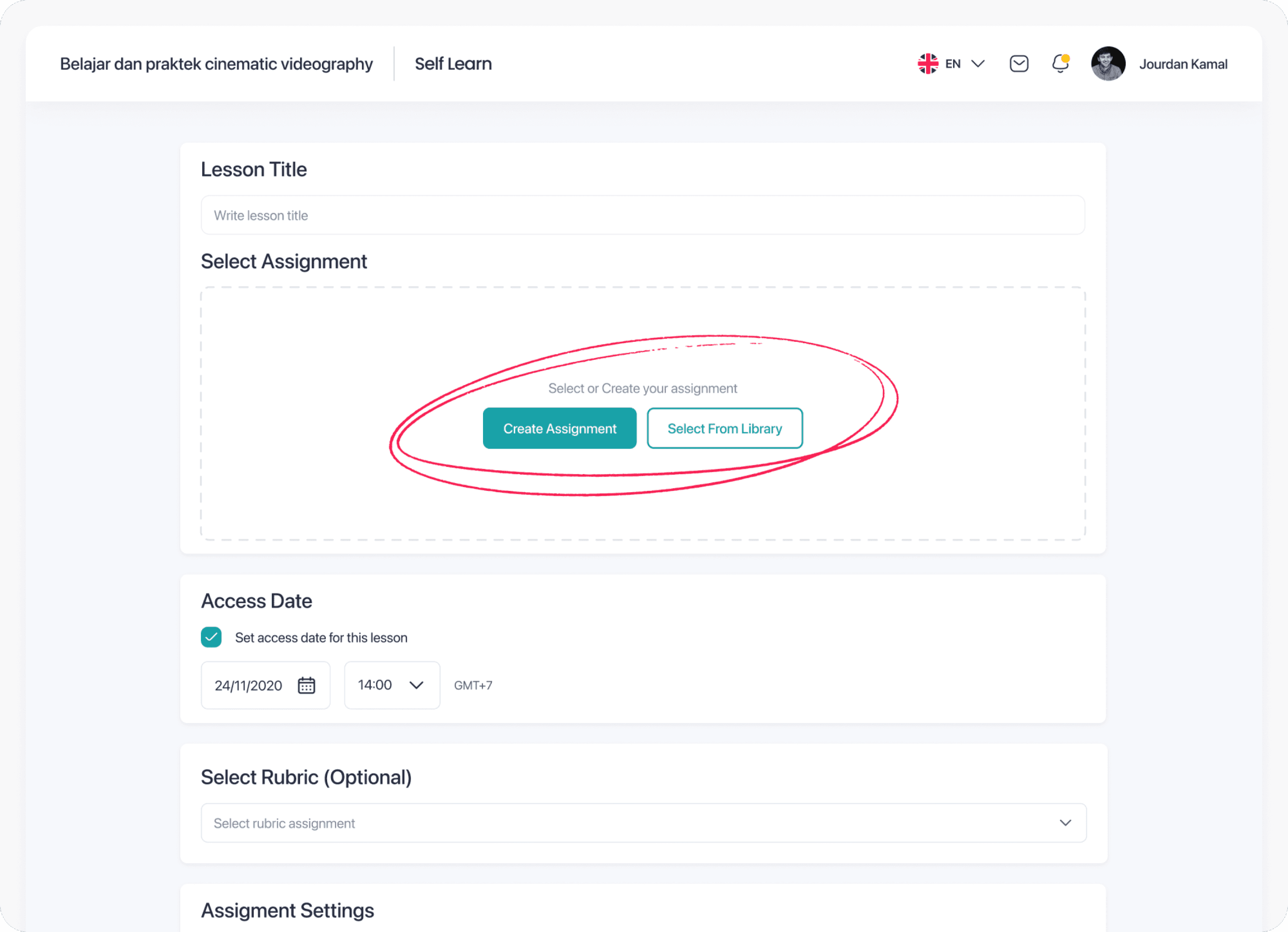
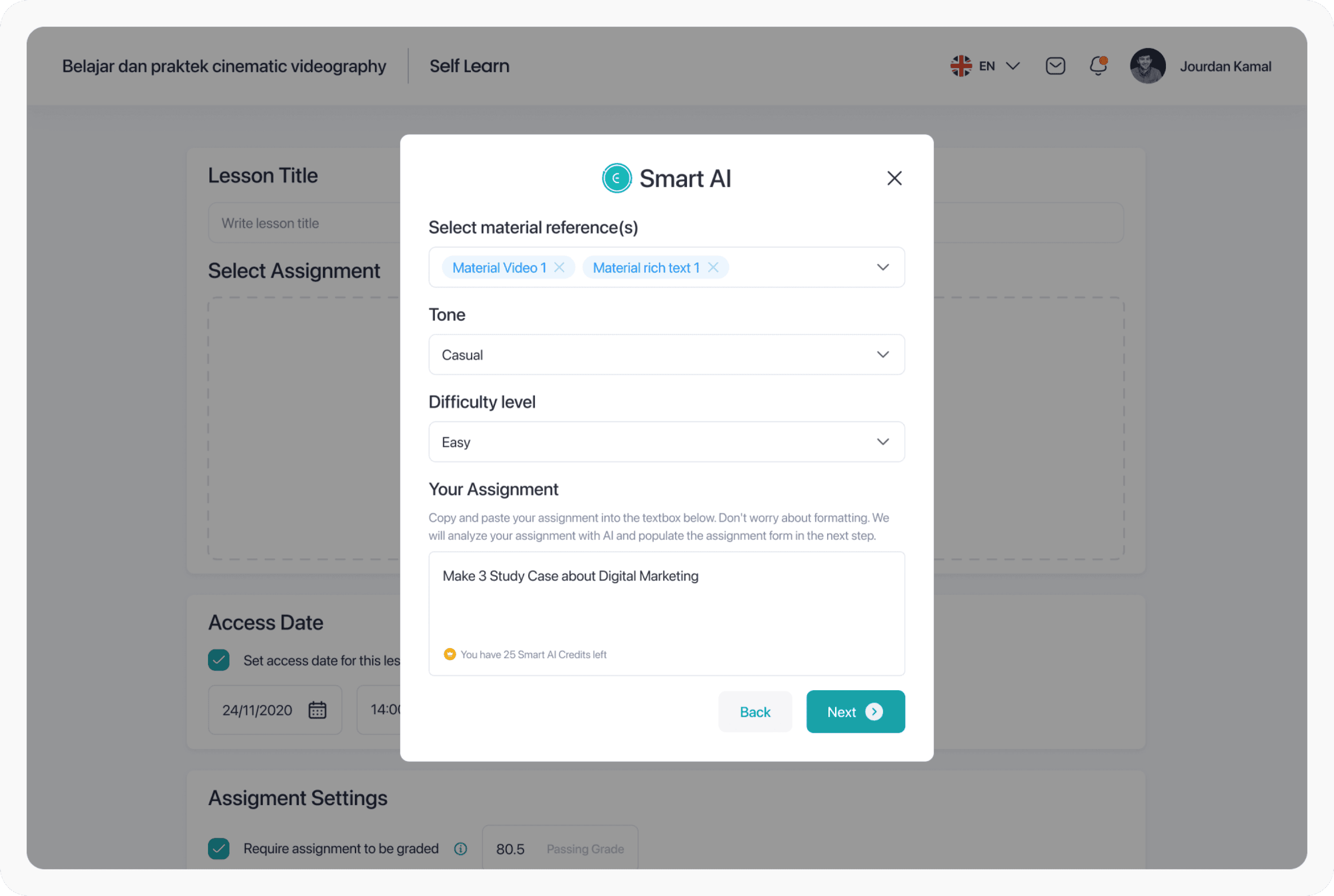
Educators can reuse an existing assignment from the library or create a new one. Creating new offers two equal paths: blank canvas or AI generation. Equal visual weight was intentional and we did not want to push educators toward AI before they were ready. Choosing AI brings up a structured brief form reference materials, tone, difficulty level, and optional extra instructions.
Screen 6 and 7
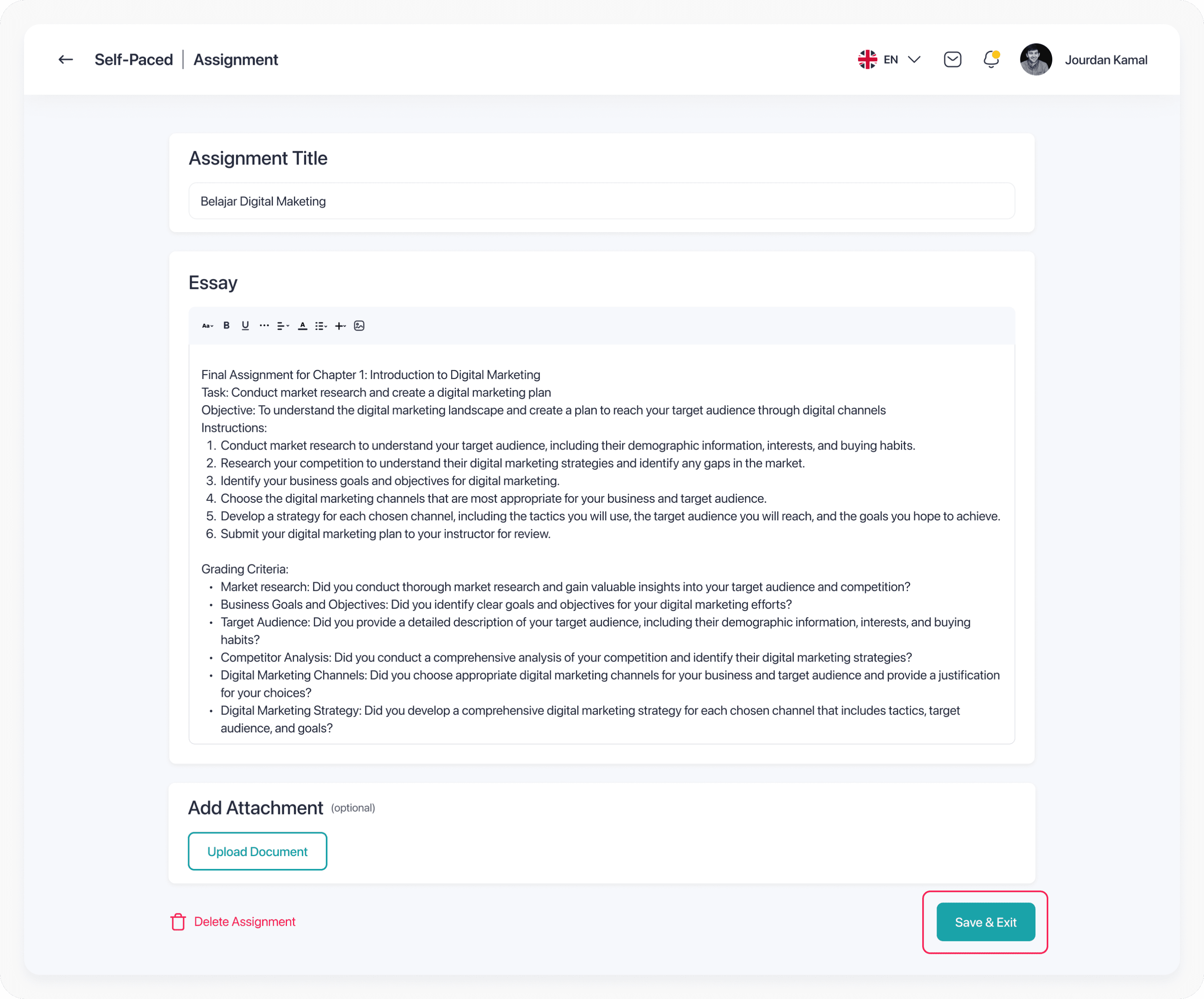
Generated content, fully editable before saving
Educators can reuse an existing assignment from the library or create a new one. Creating new offers two equal paths: blank canvas or AI generation. Equal visual weight was intentional and we did not want to push educators toward AI before they were ready. Choosing AI brings up a structured brief form reference materials, tone, difficulty level, and optional extra instructions.
Section 2 - Create Grading Rubric
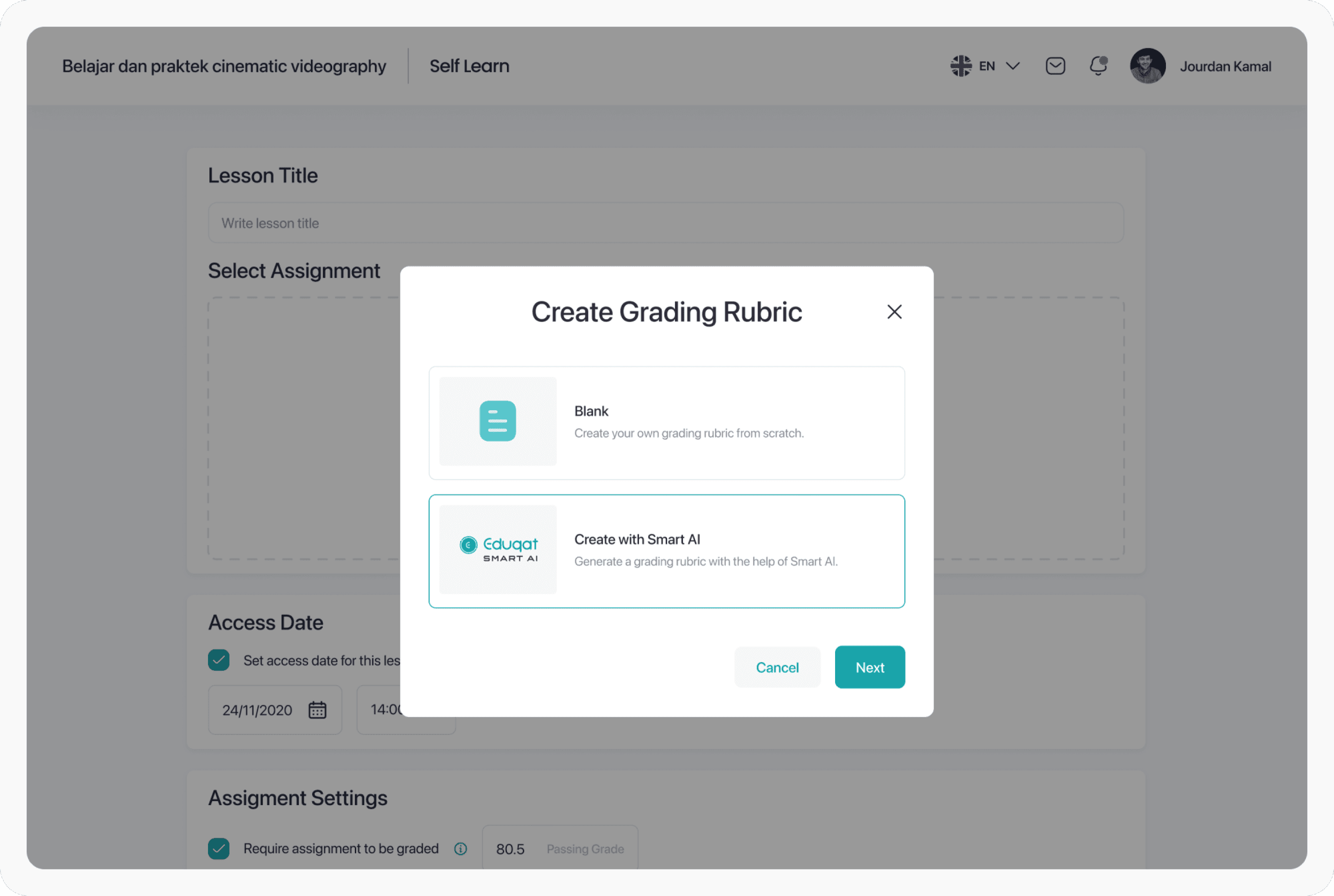
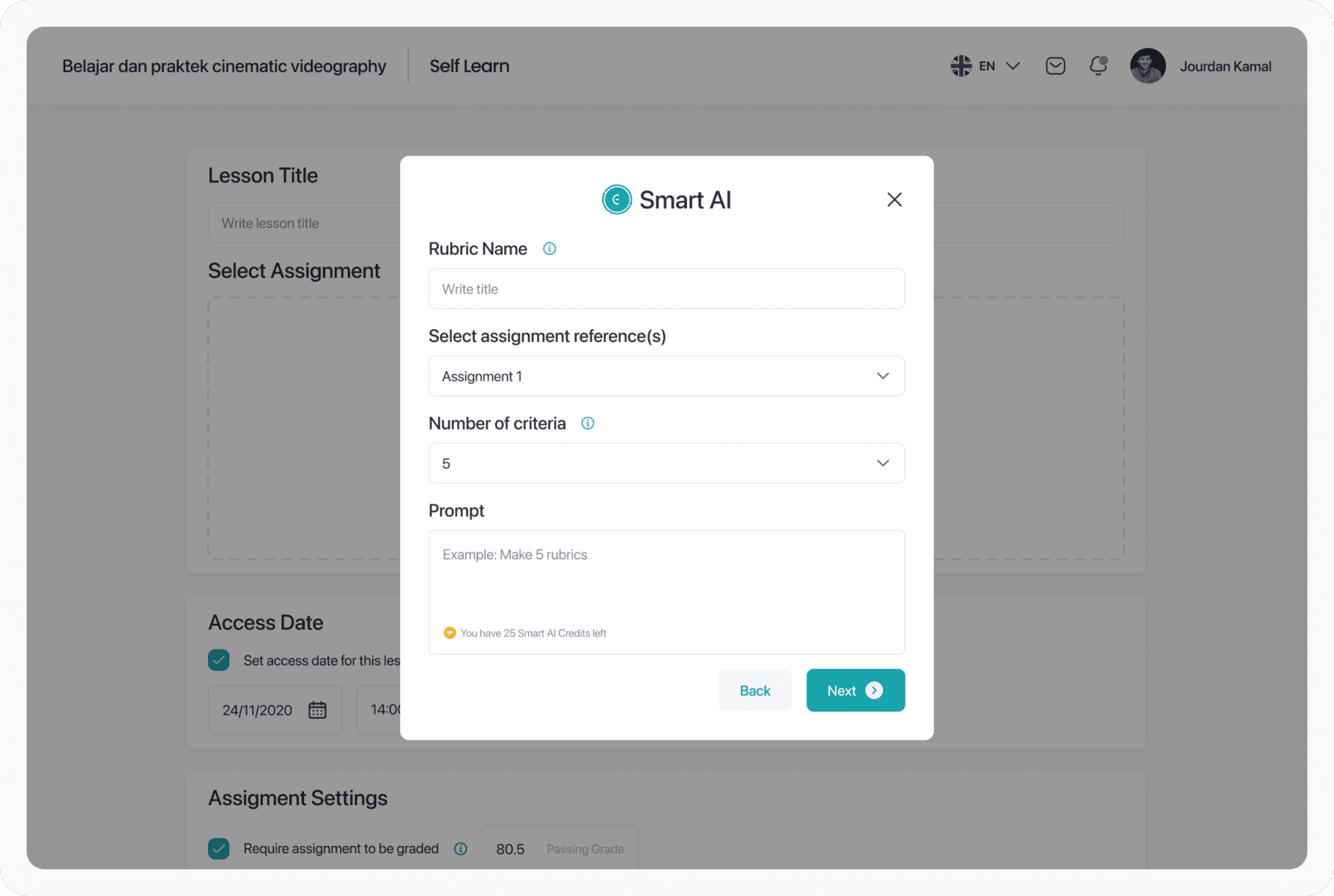
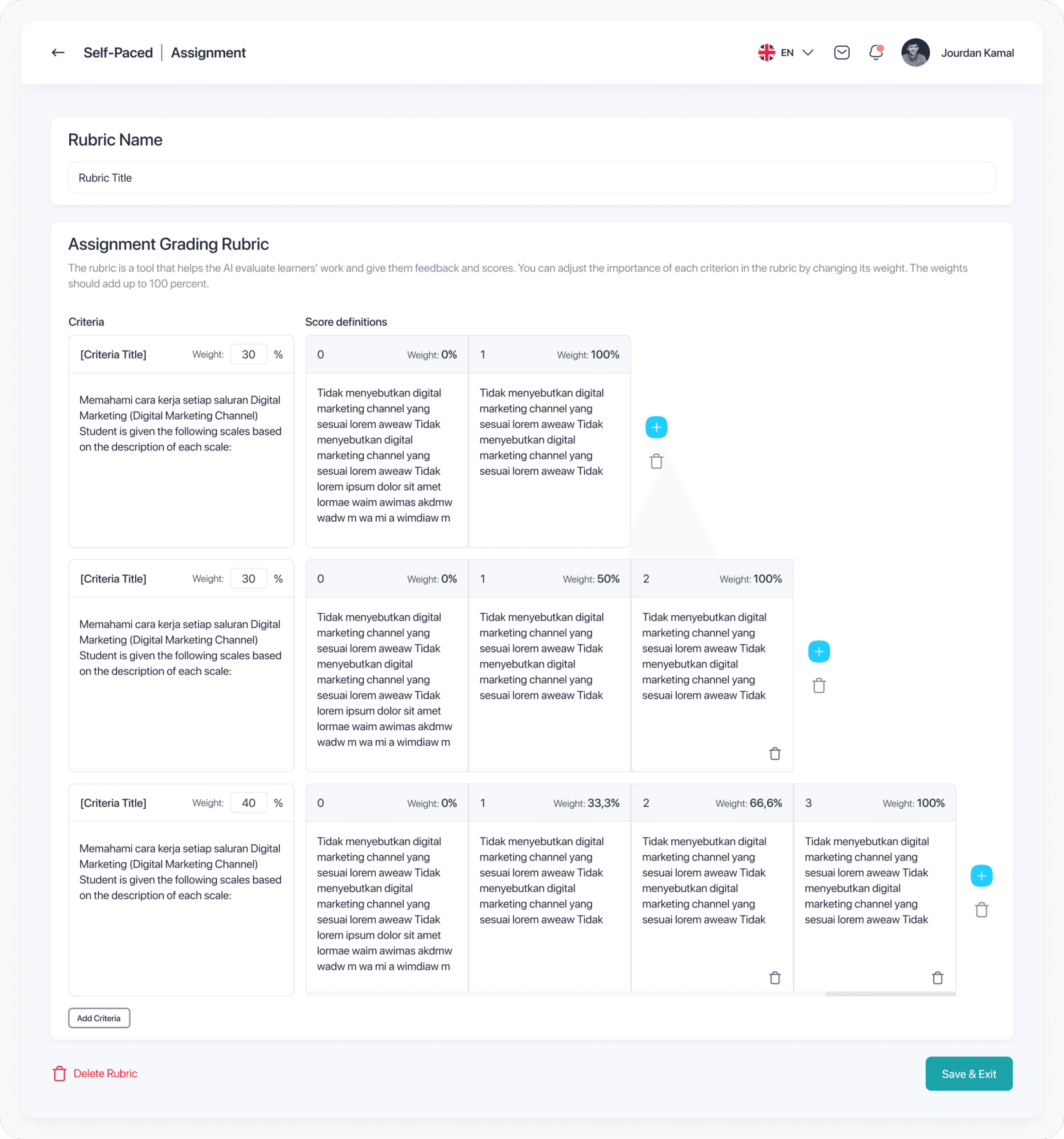
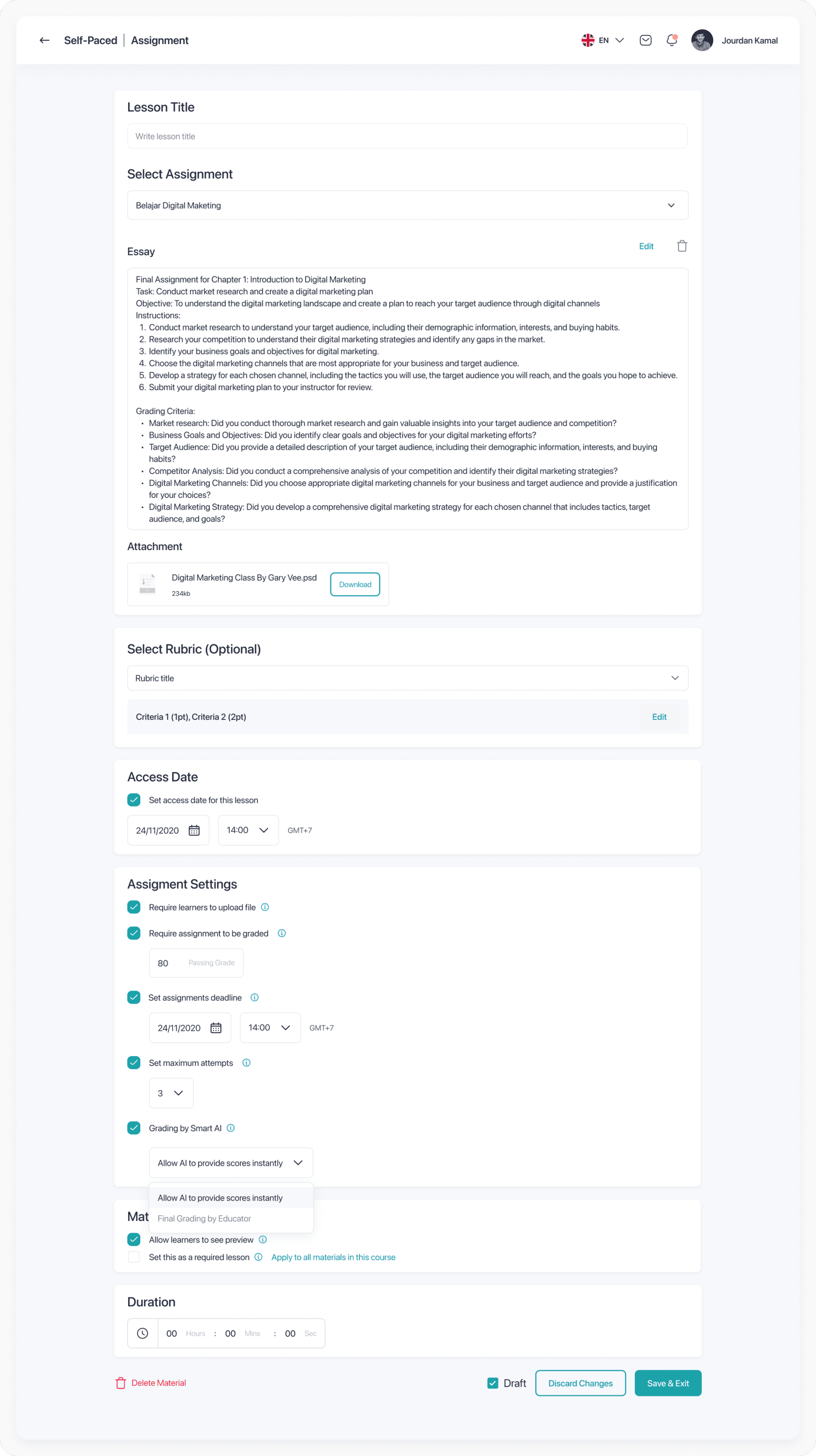
Screen 1 to 4
AI-generated criteria, fully editable and locked after publish
The educator creates a new rubric from the Assignment Details page. A modal offers blank or AI-generated. With AI, they input a rubric name, reference assignment, number of criteria, and any notes. The AI generates the rubric criteria, descriptions, and percentage weights and all editable. Once saved and the assignment is published, the rubric locks to ensure all student submissions are evaluated against the same criteria.
Section 3 - Assignment Grading Dashboard
Screen 1 to 3
From assignment library to individual submission review
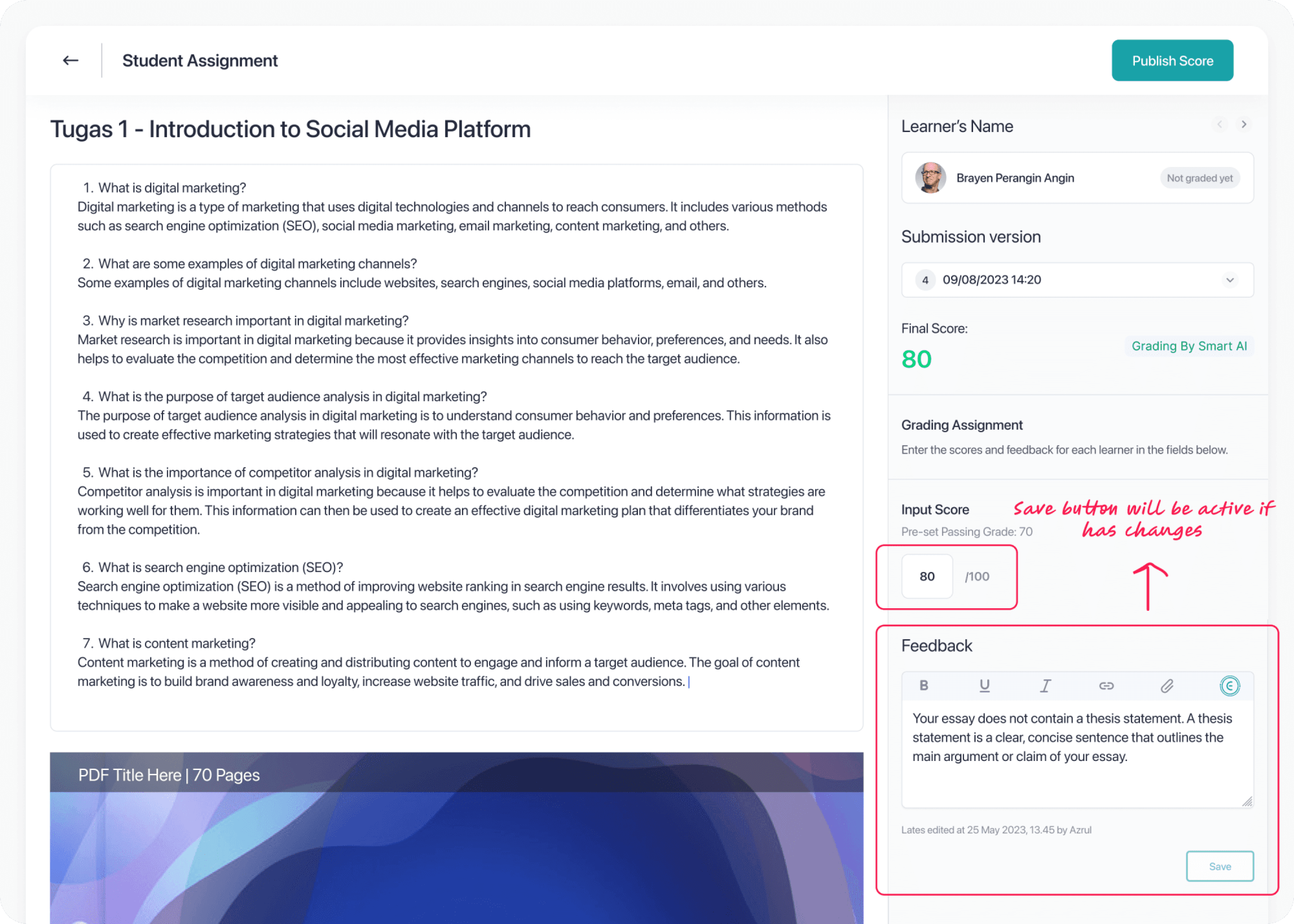
he Assignment Library shows all courses with active assignments. Clicking into a course reveals the assignment list. From there, selecting an assignment opens the submission list with each student's grading status and score. The grading dashboard shows the student's submission alongside full grade input and feedback controls.
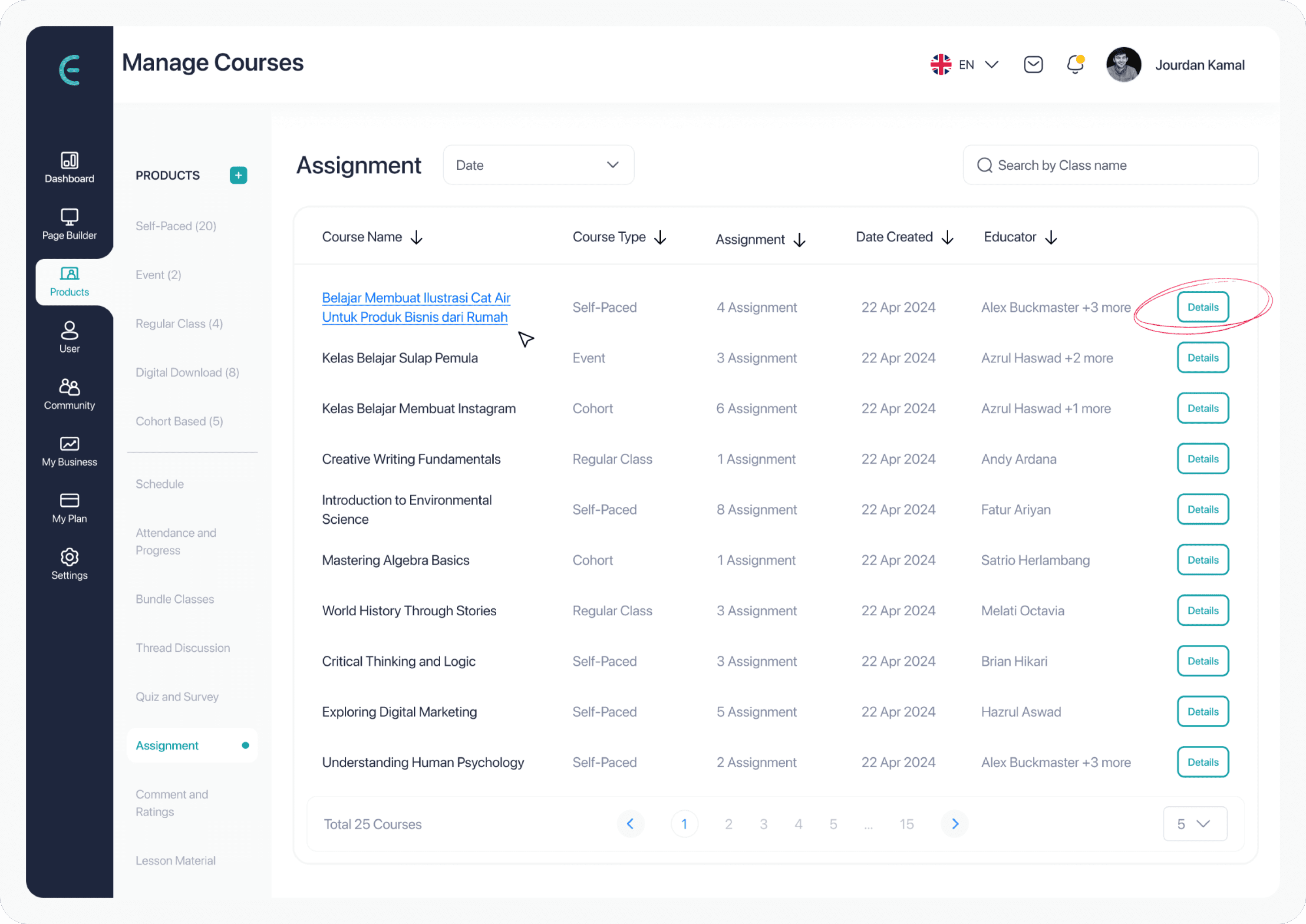
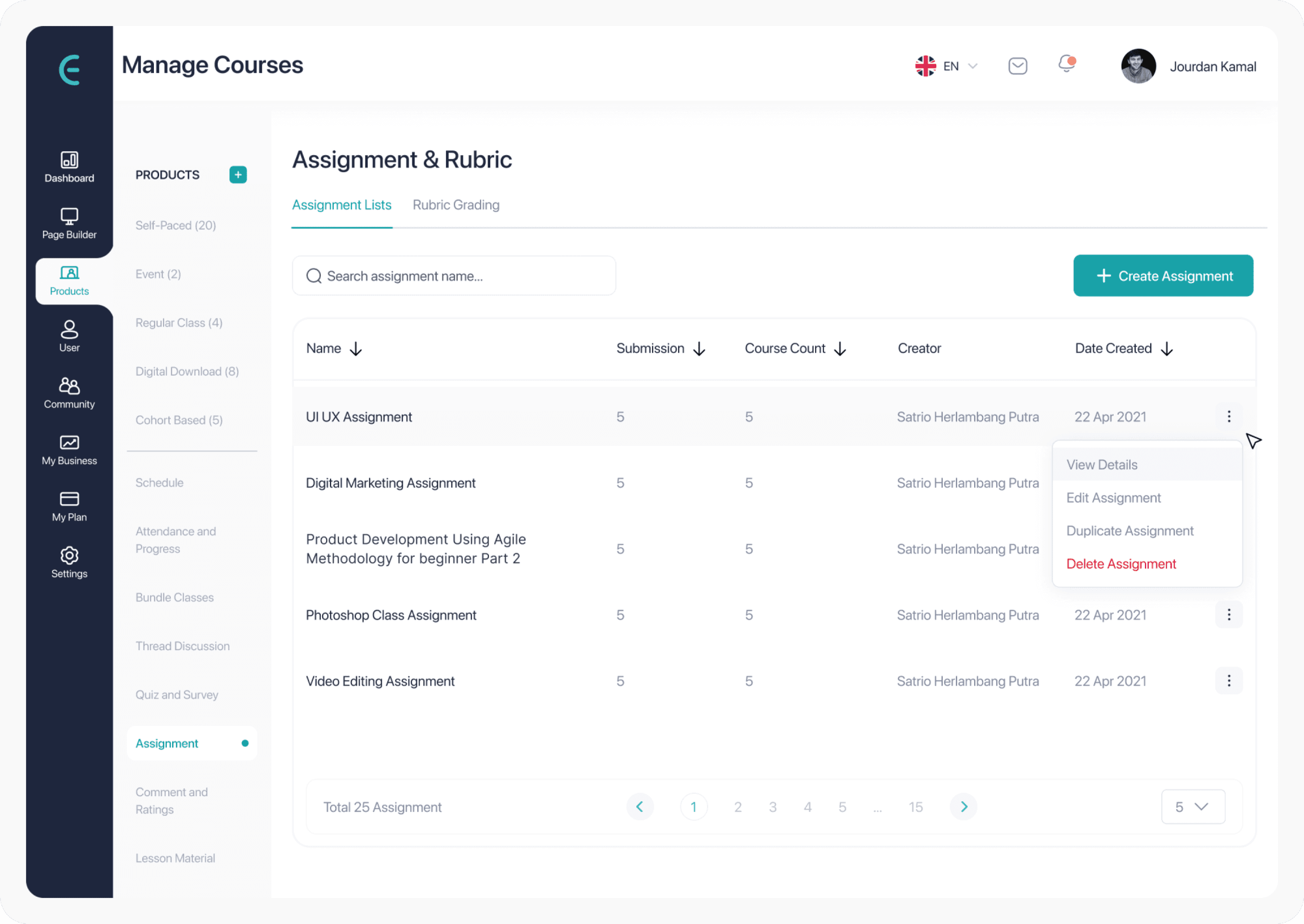
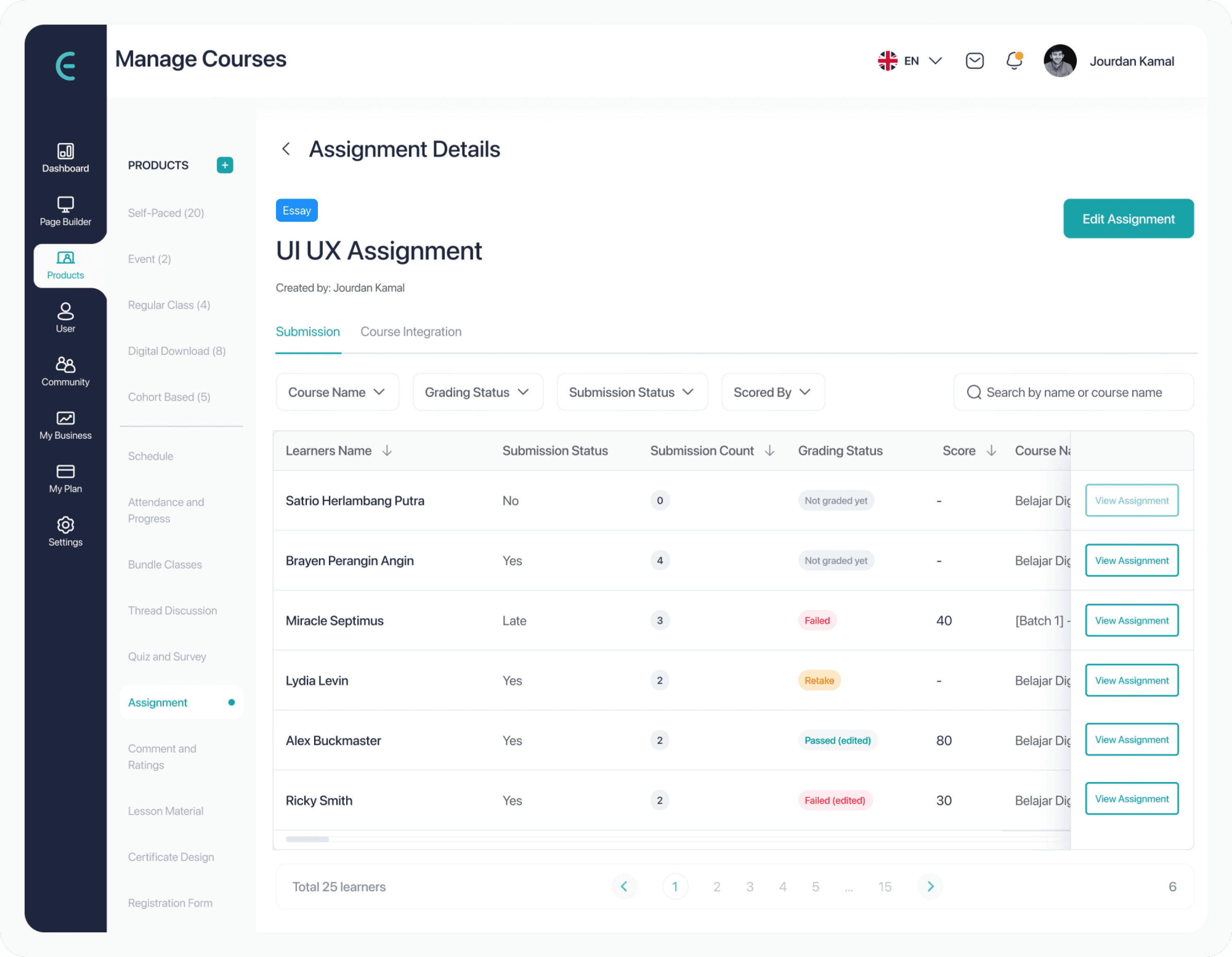
Screen 4 to 6
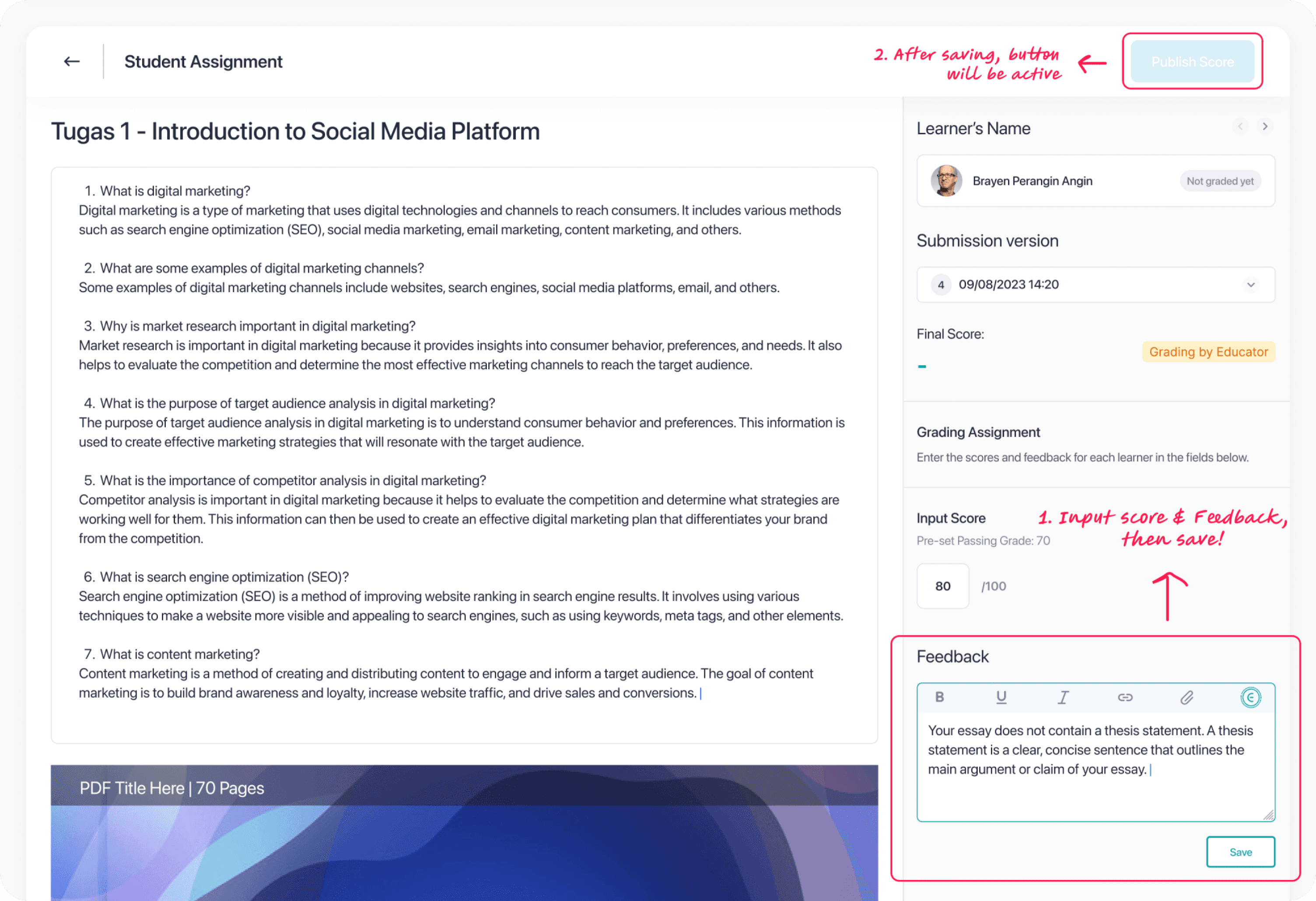
AI scores and feedback drafts, so educator validates before publishing
When Auto Grading is enabled, the AI fills in the score and feedback automatically. The educator can regenerate feedback or adjust the score manually. The Publish button stays disabled until the educator saves their review and nothing reaches the student without that validation step. When a rubric is active, scores are calculated from rubric point levels, not entered freely, which enforces consistency and keeps scoring criteria visible at all times.

Section 4 - Student View
Screen 1 and 2
Score, rubric breakdown, and feedback are all in one place
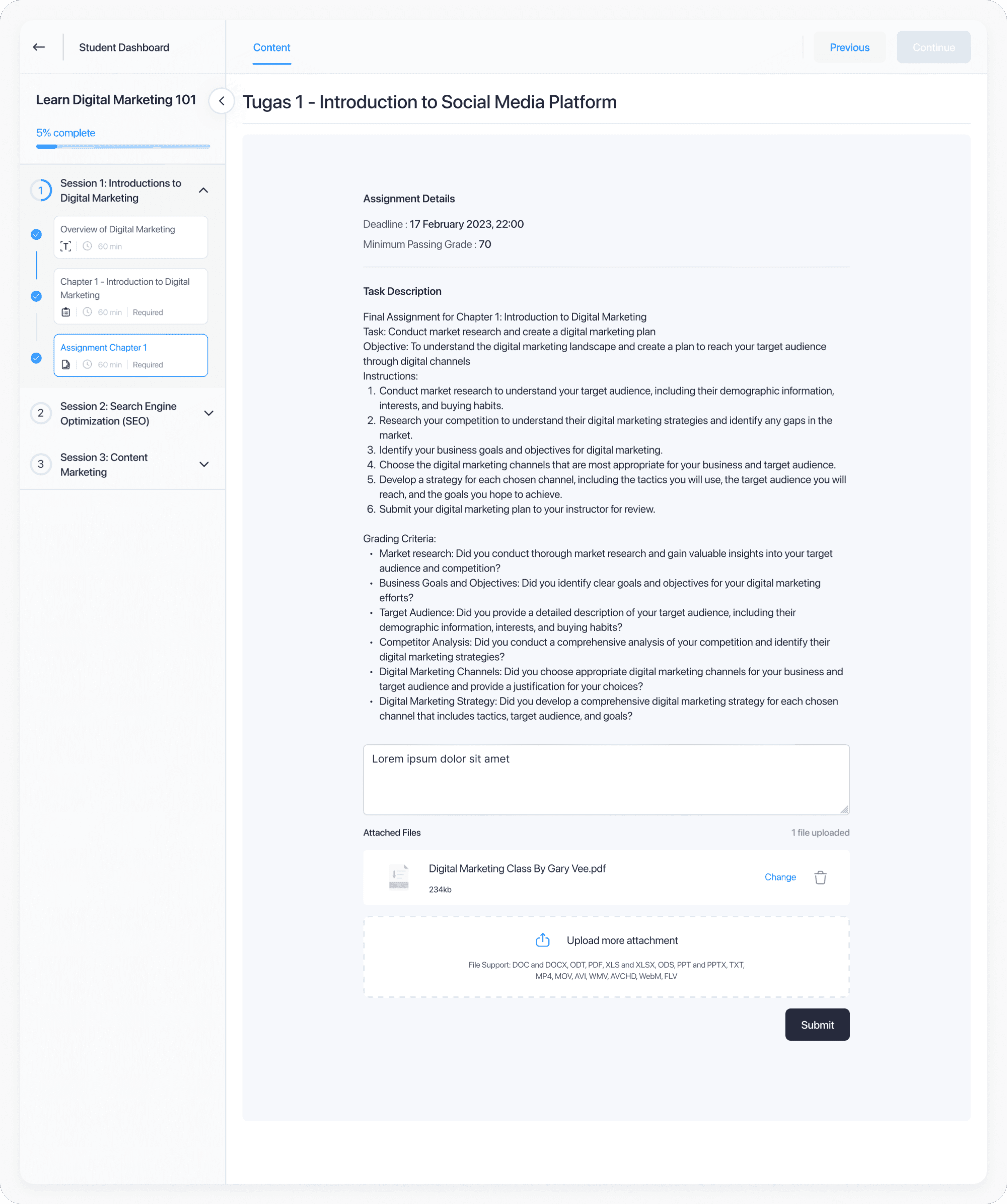
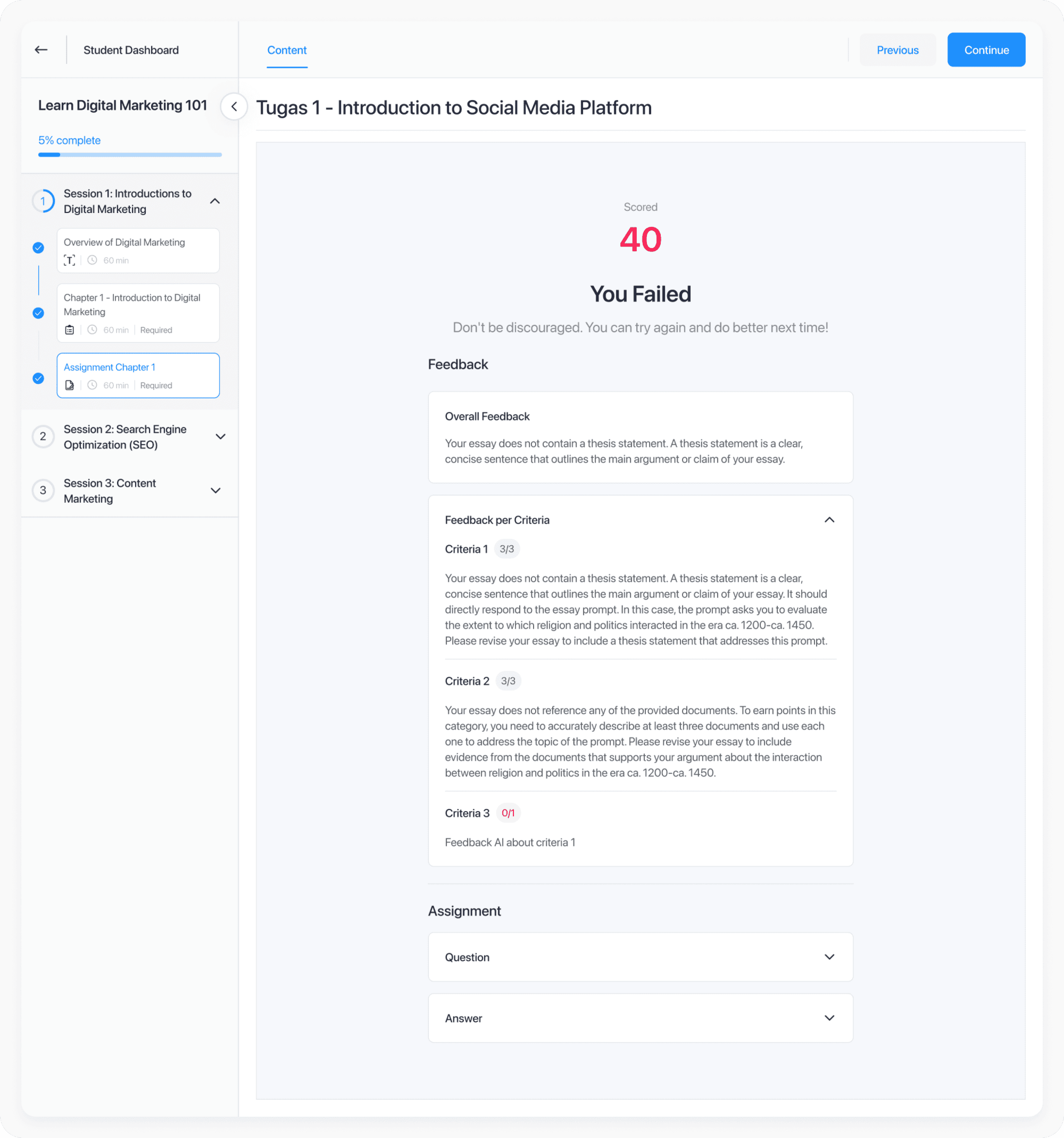
After grading is published, students view their final score alongside overall feedback, per-criterion rubric feedback, the original question, and their submitted answer. Rubric-level feedback is far more actionable than a single number with a generic comment. Knowing exactly which criteria fell short gives students something concrete to improve.
10 - WHAT ALMOST BROKE IT
Three weeks before launch, the AI accuracy numbers came in lower than the team expected.
“This is where most case studies get vague. I will tell you exactly what the constraint was, what I recommended, and what I had to give up to protect the decision that mattered.”
The conflict happened at stake
Internal testing of AI grading accuracy on open-ended responses came in at 78% agreement with educator grades meaningfully lower than the 90% threshold the team had been working toward. Engineering projected that reaching 90% in the MVP timeline was not feasible without significantly extended development time.
The options on the table: delay launch until accuracy improved, launch with 78% and manage expectations, or adjust the product design so the accuracy constraint was no longer the critical variable.
What I recommended
I pushed for the third option. If the system surfaced low-confidence assessments clearly and made educator review efficient rather than burdensome, then the accuracy of the underlying model became less important than the quality of the human review layer sitting on top of it. A 78% accurate AI that an educator could quickly review and correct in 30 seconds per submission was more valuable than a 90% accurate AI that educators did not trust and therefore would not use.
What happened next: We redesigned low-confidence submission flagging to surface the 22% of assessments most likely to need adjustment at the top of the grading queue. The effective accuracy of what actually reached students after educator review was over 97%.
The honest trade-off
What I gave up
✕
A more impressive version one announcement
✕
The kind of full automation that wins attention in a competitive market
✕
Some goodwill with the PM who wanted a bigger feature set
What I protected
✓
Educator trust and the feeling that the course belonged to them
✓
A shipping timeline that engineering could actually deliver
✓
A product foundation that could be expanded to full automation in version two.
11 - RESULTS
60% faster creation. 4x faster grading. Here is what those numbers actually represent.
Post-launch data from the first months after the AI Smart Assignment system shipped, with honest context about measurement limitations.
These metrics are based on internal workflow benchmarks and early tester cohorts, not a statistically significant controlled experiment. Post-launch cohort tracking is ongoing. I am honest about this distinction because overstating early metric certainty leads to bad product decisions.
12 - Reflection
Two decisions I would revisit, one that worked better than expected, and three principles I now carry into every AI product I design.
What I’d change
1. Observe real educators before designing
Most research came from secondary sources and stakeholder synthesis. Watching educators grade real assignments would have revealed critical behavior patterns much earlier.
Bring AI capability constraints into design earlier
The accuracy constraint existed long before it reached design. Treating AI capability as a design input from the start would have created better product decisions.
What worked best
Reframing the problem early
We stopped asking “How do we generate grading with AI?” and started asking “How do we help educators grade with more confidence?”
Making rubric creation mandatory proved to be the right decision. It added friction upfront, but created more structure, fairness, and trust throughout the experience.
Principles I carry forward
AI should surface confidence, not certainty
Trust grows when systems clearly show where they are reliable and where human judgment still matters.
Human review is part of the product
Human oversight is not a temporary safeguard. It is what makes the whole experience trustworthy.
Design with technical constraints early
Better AI products emerge when capability limits are part of product thinking from the beginning.
BACK TO ALL WORKS
🔥 FEATURED
Product Design • SaaS • eLearning • AI • 2025
Grading Thousands of Submissions
Without Losing What Makes
Feedback Human
Helping educators move from idea to structured course faster, while keeping full control over their content.
ROLE
Product Designer
timeline
2 - 3 Months
Collaboration
1 PM, 1 Head of Product, 3 Designers, 2 UATs, and 4 Engineers
Ownership
Owned UX end-to-end for the AI assignment flow

Go to top